
Toyota Corolla (E120) 2002–2008 Repair Manual / Diagnostics / Cruise control system / Actuator mechanical malfunction / Inspection procedure
Toyota Corolla (E120): Inspection procedure
1 Inspect cruise control actuator assy
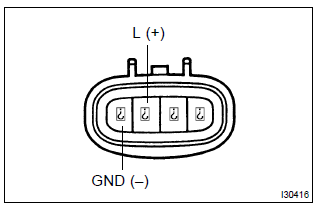
- Inspect the cruise control actuator arm locking operation.
- Turn the ignition switch to off.
- Disconnect the cruise control actuator assy connector.
- Connect the positive (+) lead from the battery to the terminal 3 (l) of cruise control actuator assy and the negative (–) lead to terminal 4 (gnd).
Notice
: do not connect the high tension cables to the wrong battery terminal. You will damage the cruise control actuator assy.
- Move the control plate by hand.
Ok: control plate does not move.
- inspect the cruise control actuator assy operation.
- Turn the ignition switch to off.
- Disconnect the cruise control actuator assy connector.
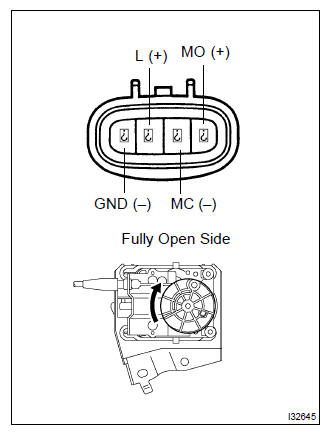
- Connect the positive (+) lead from the battery to terminals
1 (mo) and 3 (l) of cruise control actuator
assy, connect the negative (–) lead to terminals 2
(mc) and 4 (gnd) of cruise control actuator assy.
Ok: control arm moves to full open side.
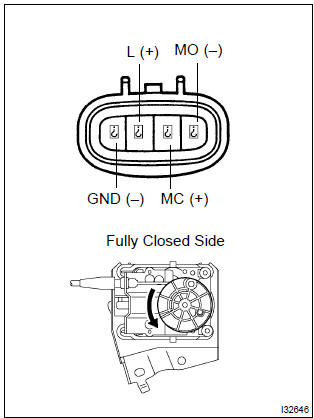
- Connect the positive (+) lead from the battery to terminals
2 (mc) and 3 (l) of cruise control actuator
assy, connect the negative (–) lead to terminals 1
(mo) and 4 (gnd) of cruise control actuator assy.
Ok: control arm moves to full close side.


2 Check harness and connector(between cruise control ecu assy and cruise control actuator assy)
- Check for open and short circuit in harness and connector between cruise control ecu assy and cruise control actuator assy (actuator motor)


Check and replace cruise control ecu assy


Other materials:
Installing child restraints
Follow the child restraint system manufacturer's instructions.
Firmly secure child restraints to the seats using the LATCH anchors or a seat
belt. Attach the top tether strap when installing a child restraint.
The lap/shoulder belt can be used if your child restraint system is not compatible ...
Key confinement prevention function does not work
properly (unlock warning switch circuit)
Circuit description
The unlock warning switch turns on when the key is inserted in the ignition
key cylinder and the door courtesy
switch turns on when the driver’s door is opened, and the integration relay
monitors both switches conditions.
According to these switches conditions, the int ...
Circuit description
The vehicle speed sensor circuit is sent to cruise control ecu assy as a
vehicle speed signal. For each rotation
of the shaft, the vehicle speed sensor sends a signal through the combination
meter assembly to the
cruise control ecu assy (see the following chart). The cruise control ecu assy
...