
Toyota Corolla (E120) 2002–2008 Repair Manual / Diagnostics / Supplemental restraint system / Airbag sensor assy malfunction / Inspection procedure
Toyota Corolla (E120): Inspection procedure
1 Check voltage at ig2 of airbag sensor assy center
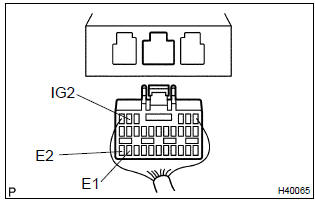
- Disconnect the negative (–) terminal cable from the battery, and wait at least for 90 seconds.
- disconnect the connector of the airbag sensor assy center.
- connect the negative (–) terminal cable to the battery, and wait at least for 2 seconds.
- turn the ignition switch to on.
- measure the voltage between e1 (e2) and ig2 of the airbag
sensor assy center connector.
Ok: voltage: 10 – 14 v


2 Check air bag sensor assy center
Sst 09843–18040
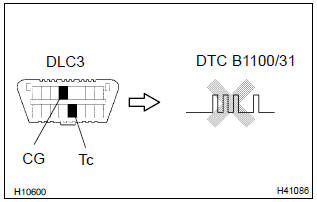
- Turn the ignition switch to lock.
- disconnect the negative (–) terminal cable from the battery, and wait at least for 90 seconds.
- connect the connectors of all the srs components.
- connect the negative (–) terminal cable to the battery, and wait at least for 2 seconds.
- turn the ignition switch to on, and wait at least for 20 seconds.
- clear the dtc stored in memory .
- turn the ignition switch to lock, and wait at least for 20 seconds.
- turn the ignition switch to on, and wait at least for 20 seconds.
- check the dtc .
Ok: dtc b1100/31 is not output.
Hint
: codes other than code b1100/31 may be output at this time, but they are not relevant to this check.


Use simulation method to check


Other materials:
Opening the trunk
■ Trunk opener
Pull the lever upward to release
the trunk lid.
■ Trunk release button (vehicles
with a smart key system)
While carrying the electronic
key, press the button on the
trunk lid.
When all the doors are unlocked
using one of the following methods,
the trunk can be opened
without the ...
Overhaul
1. Remove roof headlining assy
2. Remove sliding roof glass sub–assy
using a torx wrench (t25), remove the 4 screws the sliding roof
glass.
pull the glass upward to remove it.
3. Remove sliding roof weatherstrip
4. Remove sliding roof drive gear sub–assy
Notice:
...
Inspection procedure
1 Inspect transmission wire(slt)
Disconnect the transmission wire connector from the
transaxle.
measure the resistance according to the value(s) in the
table below.
Standard:
Measure the resistance according to the value(s) in the
table below.
Standard (check for short):
...