
Toyota Corolla (E120) 2002–2008 Repair Manual / Diagnostics / Sfi system / Mil circuit / Inspection procedure
Toyota Corolla (E120): Inspection procedure
Hint
: troubleshoot each trouble symptom in accordance with the chart below.

1 Clear dtc
- Connect the hand–held tester or the obd ii scan tool to the dlc 3.
- turn the ignition switch on and push the hand–held tester or the obd ii scan tool main switch on.
- read the dtc .
- clear the dtc .
- check that mil is not illuminated.
Standard: mil is not illuminated


2 Check harness and connector(check for short in wire harness)
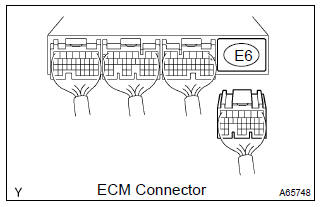
- Disconnect the e6 ecm connector.
- turn the ignition switch on.
- check that mil is not illuminated.
Standard: mil is not illuminated
- reconnect the ecm connector.


Check and repair harness and connector (combination meter – ecm)
3 Check that mil is illuminated
- Check that mil is illuminated when turning the ignition switch on.
Standard: mil is illuminated


4 Inspect combination meter assy (mil circuit)


- See the combination meter troubleshooting on page
Check and repair harness and connector (combination meter – ecm)


Other materials:
Malfunction in speedometer
Wiring diagram
Inspection procedure
1 Check combination meter assy
Remove the combination meter assy with connector still
connected.
check voltage.
Jack up either of the front wheels.
Shift the shift lever to neutral.
Turn the ignition switch to on ...
Inspection procedure
Hint:
perform the troubleshooting of dtc p0335 first. If no trouble is
found, troubleshoot the engine mechanical
systems.
Read freeze frame data using the hand-held tester or the obd ii scan tool.
Freeze frame data records
the engine conditions when a malfunction is detected. When tr ...
Adjustment
1. Inspect shift lever position
When shifting the shift lever to each position, make sure
that it moves smoothly, and the position indicator displays
correctly.
Positions which can be shifted without pressing the
shift lever knob button
r " n " d, l " 2 " d &quo ...