
Toyota Corolla (E120) 2002–2008 Repair Manual / Diagnostics / Sfi system / Vehicle speed sensor ”a” / Inspection procedure
Toyota Corolla (E120): Inspection procedure
Hint
: read freeze frame data using the hand-held tester or the obd ii scan tool. Freeze frame data records the engine conditions when a malfunction is detected. When troubleshooting, it is useful for determining whether the vehicle was running or stopped, the engine was warmed up or not, the air–fuel ratio was lean or rich, etc. At the time of the malfunction.
1 Check operation of speedometer
- Drive the vehicle and check if the operation of the speedometer in the combination meter is normal.
Hint
: the vehicle speed sensor is operating normally if the speedometer display is normal.


2 Inspect ecm(spd voltage)
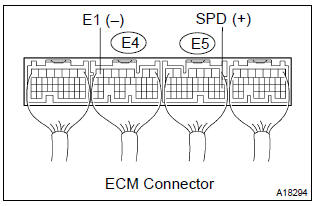
- Shift the lever to the neutral position.
- jack up the vehicle.
- turn the ignition switch on.
- check the voltage between the terminals of the e4 and e5 ecm connectors as the wheel is turned slowly.
Standard:

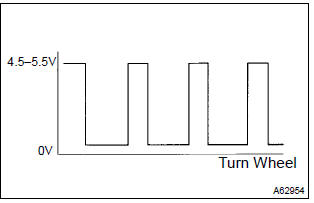
Hint
: the output voltage should fluctuate up and down similarly to the diagram on the left when the wheel is turned slowly.


Replace ecm


Other materials:
Disposal
1. Dispose shock absorber assy rear lh
Fully extend the shock absorber rod.
using a drill, make a hole in the cylinder as shown in the
illustration to discharge the gas inside.
Caution:
when drilling, chips may fly out, work carefully.
The gas is colorless, odorless and no ...
Circuit description
Refer to dtc p0130
Hint:
the ecm provides a pulse width modulated control circuit to adjust current
through the heater. The heated
oxygen sensor heater circuit uses a relay on the b+ side of the circuit.
Monitor description
The ecm uses the heated oxygen sensor information to regulate t ...
Speaking on the phone
The following screen is displayed when speaking on the phone.
To adjust the call volume
Select “-” or “+”. You can also adjust the volume using the steering switches
or the volume knob.
To prevent the other party from hearing your voice
Select “Mute”.
Inputting tones
When using ...