
Toyota Corolla (E120): Inspection
1. Inspect outer mirror switch assy
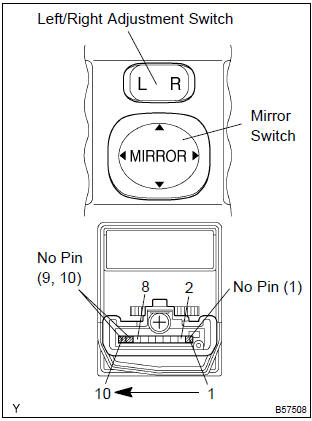
- Inspect the mirror switch continuity.
- Left side for left/right adjustment switch: inspect the mirror switch continuity
Standard (left side):
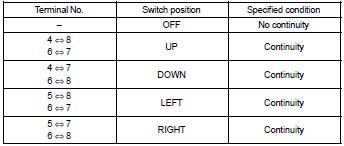
If the result is not as specified, replace the switch assembly.
- Right side for left/right adjustment switch: inspect the mirror switch continuity.
Standard (right side):
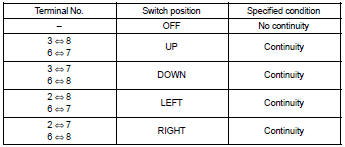
If the result is not as specified, replace the switch assembly.
2. Inspect outer rear view mirror assy lh
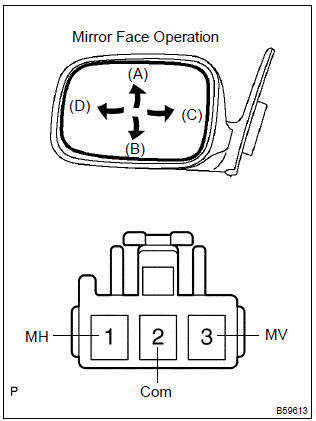
- Disconnect the outer rear view mirror assembly lh connector.
- inspect the mirror motor operation.
- Apply battery voltage as shown in the table.
Standard:
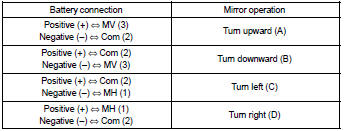
If the result is not as specified, replace the mirror assembly.
3. Inspect outer rear view mirror assy rh
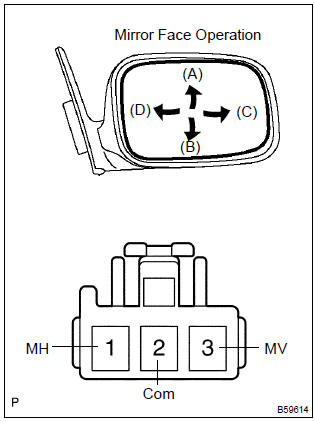
- Disconnect the outer rear view mirror assembly rh connector.
- inspect the mirror motor operation.
- Apply battery voltage as shown in the table.
Standard:
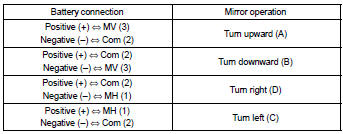
If the result is not as specified, replace the mirror assembly.


Other materials:
Road test
1. Problem symptom confirmation
Taking into consideration the results of the customer problem analysis,
try to reproduce the symptoms
of the trouble. If the problem is that the transaxle does not shift up,
shift down, or the shift point is too
high or too low conduct the following road ...
Foreword
This repair manual has been prepared to provide essential information
on body panel repair methods (including cutting and
welding operations, but excluding painting) for the toyota
corolla
Applicable models: aze141 series
zre142 series
This manual consists of body repair methods, exploded diag ...
Throttle body assy
Components
Removal & installation and disassembly & reassembly
1. Drain coolant
2. Remove cylinder head cover no.2
Remove 2 nuts, 2clips and the cylinder head cover no. 2.
3. Remove air cleaner cap sub–assy
Disconnect the maf connector.
disconnect the vsv co ...