
Toyota Corolla (E210) 2019-2026 Owners Manual / When trouble arises / Essential information / If your vehicle has to be stopped
in an emergency
Toyota Corolla (E210): If your vehicle has to be stopped in an emergency
Only in an emergency, such as if it becomes impossible to stop the vehicle in the normal way, stop the vehicle using the following procedure:
Stopping the vehicle
1. Steadily step on the brake pedal with both feet and firmly depress it.
Do not pump the brake pedal repeatedly as this will increase the effort required to slow the vehicle.
2. Shift the shift lever to N.
If the shift lever is shifted to N
3. After slowing down, stop the vehicle in a safe place by the road.
4. Stop the engine.
If the shift lever cannot be shifted to N
3. Keep depressing the brake pedal with both feet to reduce vehicle speed as much as possible.
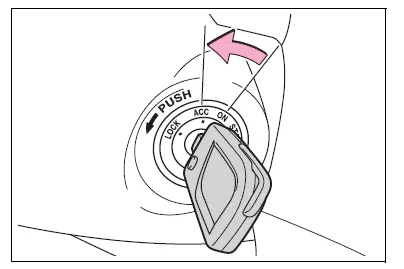
4. Vehicles without a smart key system: Stop the engine by turning the engine switch to ACC.
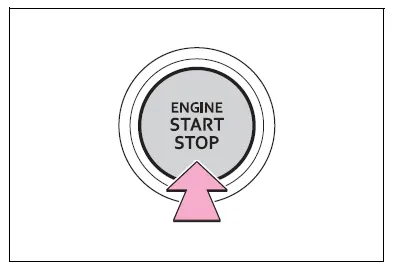
4. Vehicles with a smart key system: To stop the engine, press and hold the engine switch for 2 consecutive seconds or more, or press it briefly 3 times or more in succession.
5. Stop the vehicle in a safe place by the road.
WARNING
■If the engine has to be turned off while driving
- Power assist for the brakes and steering wheel will be lost, making the brake pedal harder to depress and the steering wheel heavier to turn. Decelerate as much as possible before turning off the engine.
- Vehicles without a smart key system: Never attempt to remove the key, as doing so will lock the steering wheel.


Other materials:
Cruise control system
On–vehicle inspection
1. Check play of accelerator auto drive cable assy
Push the wire into the cable so as not to move the throttle
link and put a mark on the position shown in the illustration.
Pull the wire and check the moved distance of the mark.
2. Adjust play in acce ...
Registering a Bluetooth® phone for the first time
To use the hands-free system, it is necessary to register a Bluetooth® phone
with the system.
Once the phone has been registered, it is possible to use the hands-free system.
For details about registering a Bluetooth® device
1 Turn the Bluetooth® connection setting of your cellular phone on. ...
Engine mechanical
Service data
Torque specification
...