
Toyota Corolla (E170) 2014–2019 Owners Manual / Interior features / Using the Multimedia system / Selecting the audio source / Changing audio source
Toyota Corolla (E170): Changing audio source
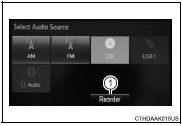
1 Press the “AUDIO” button to display the audio source selection screen.
If the audio source selection screen is not displayed, press the “AUDIO” button again.
2 Select the desired audio source.
1 Select the desired audio source then
 or
or
 to reorder.


Other materials:
On–vehicle inspection
1. Inspection throttle body idle speed control valve assy
Notice:
it is impossible to check the resister value and the operation
of isc valve by itself, because the isc valve
has an ic circuit inside it, which transforms the duty
signal from the ecm to the derive signal.
After check ...
Playing an audio CD and MP3/WMA/AAC discs (Multimedia system)
CD player operation
Insert disc or select “CD” on the audio source selection screen with a disc
inserted to begin listening to a CD.
Audio control screen
Pressing the “AUDIO” button displays the audio control screen from any screens
of the selected source.
1 Audio source selection sc ...
Sound setting
1 Display the “Phone/Message Settings” screen. 2 Select “Sound Settings” on the
“Phone/Message Settings” screen.
1 Set the desired ringtone.
2 Adjust the ringtone volume.
3 Adjust the message readout volume.
4 Set the desired incoming SMS/MMS tone.
5 Adjust the incoming SMS/ MMS t ...