
Toyota Corolla (E120): Fuel
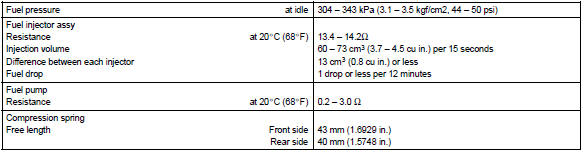
Service data
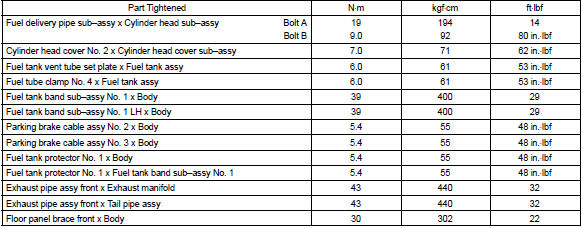
Torque specification
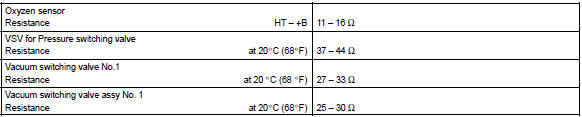
Emission control
Service data


Other materials:
Inspection procedure
Hint:
read freeze frame data using the hand-held tester or the obd ii scan tool.
Freeze frame data records the
engine conditions when a malfunction is detected. When troubleshooting, it is
useful for determining whether
the vehicle was running or stopped, the engine was warmed up or not, the ...
If the vehicle becomes stuck
Carry out the following procedures
if the tires spin or
the vehicle becomes stuck
in mud, dirt or snow:
Recovering procedure
1. Stop the engine. Set the
parking brake and shift the
shift lever to P.
Do not press the shift release button
after shifting the shift lever to P.
2. Remove the mud, snow ...
Installation with LATCH system
1 Widen the gap between the seat cushion and seatback slightly.
► Type A
2 Latch the hooks of the lower straps onto the LATCH anchors. If the child restraint
has a top tether strap, the top tether strap should be latched onto the top tether
strap anchor.
For owners in Canada: The symbol ...