
Toyota Corolla (E210) 2019-2026 Owners Manual / For safety and security / For safe use / Before driving
Toyota Corolla (E210): Before driving
Observe the following before starting off in the vehicle to ensure safety of driving.
Floor mat
Use only floor mats designed specifically for vehicles of the same model and model year as your vehicle. Fix them securely in place onto the carpet.
1. Insert the retaining hooks (clips) into the floor mat eyelets.
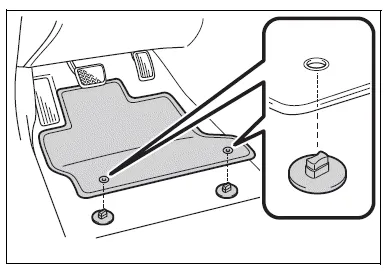
2. Turn the upper knob of each retaining hook (clip) to secure the floor mats in place.
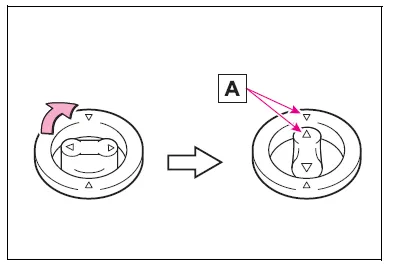
Always align the  marks A.
The shape of the retaining hooks (clips) may differ from that shown in the illustration.
WARNING
Observe the following precautions.
Failure to do so may cause the driver's floor mat to slip, possibly interfering with the pedals while driving. An unexpectedly high speed may result or it may become difficult to stop the vehicle.
This could lead to an accident, resulting in death or serious injury.
■When installing the driver's floor mat
- Do not use floor mats designed for other models or different model year vehicles, even if they are Toyota Genuine floor mats.
- Only use floor mats designed for the driver's seat.
- Always install the floor mat securely using the retaining hooks (clips) provided.
- Do not use two or more floor mats on top of each other.
- Do not place the floor mat bottom- side up or upside-down.
■Before driving
- Check that the floor mat is securely fixed in the correct place with all the provided retaining hooks (clips). Be especially careful to perform this check after cleaning the floor.
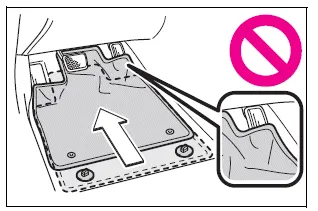
- With the engine stopped and the shift lever in P, fully depress each pedal to the floor to make sure it does not interfere with the floor mat.


Other materials:
Trailer towing
Toyota does not recommend
towing a trailer with
your vehicle. Toyota also
does not recommend the
installation of a tow hitch or
the use of a tow hitch carrier
for a wheelchair, scooter,
bicycle, etc. Your vehicle is
not designed for trailer towing
or for the use of tow
hitch mounted carriers.
Dingh ...
Body panel sealing areas
Be sure to apply body sealer to the body panel joints and door edges (tip of
outer panel folded part), etc., To waterproof
and rustproof them.
Hint:
apply degreasing agent to a clean cloth and clean the sealer
application areas.
After removing the applied spot sealer from the se ...
Although system is powered,cd cannot be played
Wiring diagram
Inspection procedure
1 Check if a proper cd is inserted
Check that a proper cd is inserted.
Make sure that the cd is a normal audio cd, and that there is no
deformation, flaw, stain, burr
and other defects on the cd.
Standard: normal audio cd.
Reference:
...