
Toyota Corolla (E170) 2014–2019 Owners Manual / Maintenance and care / Maintenance / General maintenance / Engine compartment
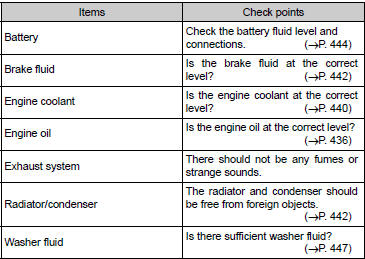
Toyota Corolla (E170): Engine compartment


Other materials:
Adjustment
Hint:
in the rh side, work in the same procedure as in the lh
side.
Since the centering bolt is used as a door side hinge bolt,
the door hinge cannot be adjusted with it on. Substitute
the bolt with washer for the centering bolt.
1. Inspect front door panel sub–assy lh
Che ...
Customization
Customizable features
Your vehicle includes a variety of electronic features that can be personalized
to suit your preferences. Programming these preferences requires specialized equipment
and may be performed by your Toyota dealer.
Customizing vehicle features
■ Changing by using the n ...
If your vehicle overheats
The following may indicate that your vehicle is overheating.
● Vehicles without a multi-information display: The high engine coolant temperature
warning light comes on or a loss of power is experienced.
Vehicles with a multi-information display: The engine coolant temperature gauge&n ...