
Toyota Corolla (E210) 2019-2026 Owners Manual / Maintenance and care / Wireless remote control/electronic key battery
Toyota Corolla (E210): Wireless remote control/electronic key battery
Replace the battery with a new one if it is depleted.
As the key may be damaged if the following procedure is not performed properly, it is recommended that key battery replacement be performed by your Toyota dealer.
■If the key battery is depleted
The following symptoms may occur:
- The smart key system (if equipped) and wireless remote control will not function properly.
- The operational range will be reduced.
Items to prepare
- Flathead screwdriver
- Small flathead screwdriver
- Lithium battery CR2032 (vehicles without a smart key system), or CR2450 (vehicles with a smart key system)
■Use a CR2032 (vehicles without a smart key system), or CR2450 (vehicles with a smart key system) lithium battery
- Batteries can be purchased at your Toyota dealer, local electrical appliance shops or camera stores.
- Replace only with the same or equivalent type recommended by the manufacturer.
- Dispose of used batteries according to local laws.
Replacing the battery
Vehicles without a smart key system
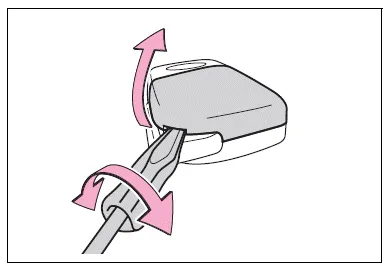
1. Remove the key cover.
To prevent damage to the key, cover the tip of the flathead screwdriver with a rag.
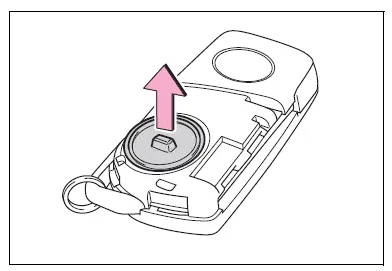
2. Remove the battery cover.
If the battery cover is difficult to remove, lift the edge to remove it.
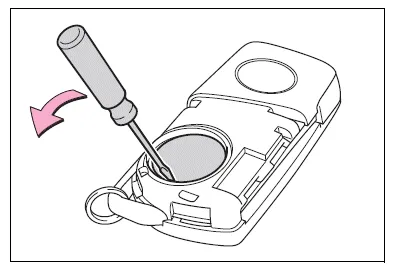
3. Remove the depleted battery using a small flathead screwdriver.
Insert a new battery with the "+" terminal facing up.
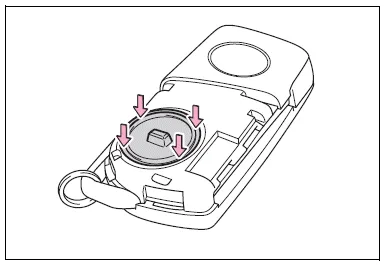
4. Install the battery cover with the tab facing up.
Push the entire edge of the battery cover into the key.
5. Install the key cover.
Align the key cover with the key and then press it straight into the key.
Make sure that the key cover is securely installed without any gaps between it and the key.

6. Operate the  or
or
 switch
and check that the doors can
be locked/unlocked.
switch
and check that the doors can
be locked/unlocked.
Vehicles with a smart key system
1. Release the lock and remove the mechanical key.
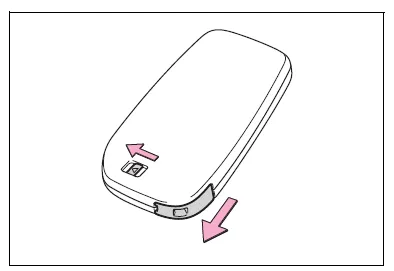
2. Remove the key cover.
To prevent damage to the key, cover the tip of the flathead screwdriver with a rag.
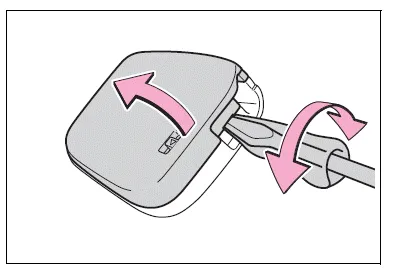
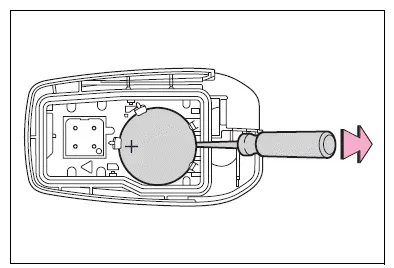
3. Remove the depleted battery using a small flathead screwdriver.
When removing the cover, the electronic key module may stick to the cover and the battery may not be visible. In this case, remove the electronic key module in order to remove the battery.
Insert a new battery with the "+" terminal facing up.
4. When installing the key cover and mechanical key, install by conducting step 2 and step 1 with the directions reversed.
5. Operate the  or
or
 switch
and check that the doors can
be locked/unlocked.
switch
and check that the doors can
be locked/unlocked.
WARNING
■Battery precautions
Observe the following precautions.
Failure to do so may result in death or serious injury.
- Do not swallow the battery.
Doing so may cause chemical burns.
- A coin battery or button battery is used in the key. If a battery is swallowed, it may cause severe chemical burns in as little as 2 hours and may result in death or serious injury.
- Keep away new and removed batteries from children.
- If the cover cannot be firmly closed, stop using the key and stow the key in the place where children cannot reach, and then contact your Toyota dealer.
- If you accidentally swallow a battery or put a battery into a part of your body, get emergency medical attention immediately.
■To prevent battery explosion or leakage of flammable liquid or gas
- Replace the battery with a new battery of the same type. If a wrong type of battery is used, it may explode.
- Do not expose batteries to extremely low pressure due to high altitude or extremely high temperatures.
- Do not burn, break or cut a battery.
NOTICE
■When replacing the battery
Use a flathead screwdriver of appropriate size. Applying excessive force may deform or damage the cover.
■For normal operation after replacing the battery
Observe the following precautions to prevent accidents:
- Always work with dry hands.
Moisture may cause the battery to rust.
- Do not touch or move any other component inside the remote control.
- Do not bend either of the battery terminals.
■When removing the battery cover (vehicles without a smart key system)
Do not forcibly remove the battery cover, otherwise it may be damaged.
If the battery cover is difficult to remove, lift the edge to remove it.


Other materials:
Installation with LATCH system
1 Widen the gap between the seat cushion and seatback slightly.
► Type A
2 Latch the hooks of the lower straps onto the LATCH anchors. If the child restraint
has a top tether strap, the top tether strap should be latched onto the top tether
strap anchor.
For owners in Canada: The symbol ...
How to use this manual
General information
1. General description
This manual is made in accordance with sae j2008.
generally, repair operations can be separated in the following 3
main processes:
Diagnosis
Removing/installing, replacing, disassembling/reassembling,
checking and adju ...
Using the audio system
Optimal use of the audio system
Sound quality (treble/bass) and volume balance can be adjusted.
1 Displays the current mode
2 Changes the following setting
• Sound quality and volume balance
The sound quality and balance setting can be changed to produce the best sound.
• Automatic ...