
Toyota Corolla (E210) 2019-2026 Owners Manual / Maintenance and care / Air conditioning filter
Toyota Corolla (E210): Air conditioning filter
The air conditioning filter must be changed regularly to maintain air conditioning efficiency.
Removing the air conditioning filter
1. Turn the engine switch off.
2. Open the glove box. Slide off the damper (if equipped).
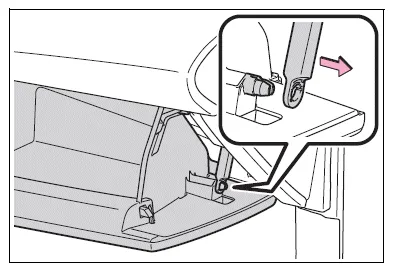
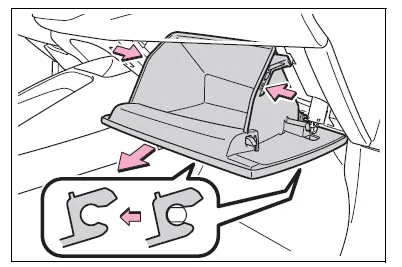
3. Push in the glove box on the vehicle's outer side to disconnect the claws. Then pull out the glove box and disconnect the lower claws.
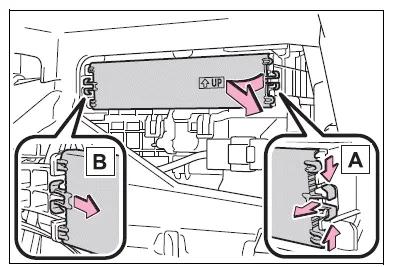
4. Unlock the filter cover (A), pull the filter cover out of the claws (B), and remove the filter cover.
5. Remove the filter case.
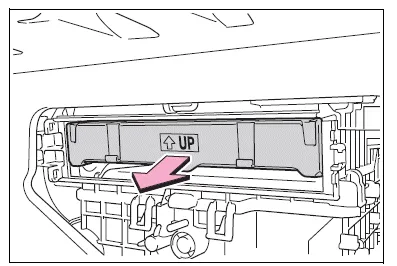
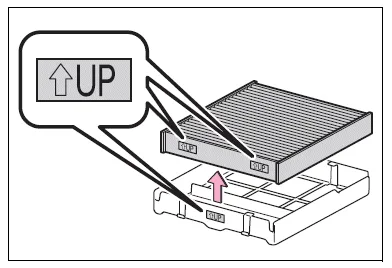
6. Remove the air conditioning filter from the filter case and replace it with a new one.
The " UP" marks shown on the
filter and the filter case should be
pointing up.
UP" marks shown on the
filter and the filter case should be
pointing up.
■Checking interval
Replace the air conditioning filter according to the maintenance schedule. In dusty areas or areas with heavy traffic flow, early replacement may be required. (For scheduled maintenance information, please refer to the "Scheduled Maintenance Guide" or "Owner's Manual Supplement".)
■If air flow from the vents decreases dramatically
The filter may be clogged. Check the filter and replace if necessary.
NOTICE
■When using the air conditioning system
Make sure that a filter is always installed.
Using the air conditioning system without a filter may cause damage to the system.
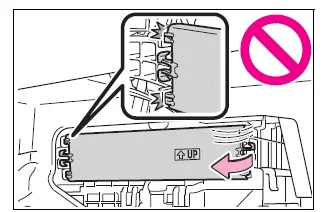
■To prevent damage to the filter cover
When moving the filter cover in the direction of arrow to release the fitting, pay attention not to apply excessive force to the claws. Otherwise, the claws may be damaged.


Other materials:
On–vehicle inspection
1. Inspect front axle hub bearing
remove the front wheel.
separate the front disc brake caliper assy .
remove the front disc.
inspect the bearing backlash.
Using a dial indicator, check the backlash near the
center of the axle hub.
Maximum: 0.05 Mm (0. ...
Inspection procedure
1 Inspect cruise control actuator assy
Inspect the cruise control actuator arm locking operation.
Turn the ignition switch to off.
Disconnect the cruise control actuator assy connector.
Connect the positive (+) lead from the battery to the
terminal 3 (l) of crui ...
Brake fluid
Bleeding
Notice:
wash the brake fluid off immediately if it comes into contact with any painted
surface.
Hint:
if any work is done on the brake system or if air in the brake lines is
suspected, bleed the air from the system.
1. Fill reservoir with brake fluid
fluid: sae j1703 or fmvss no. ...