
Toyota Corolla (E120) 2002–2008 Repair Manual / Diagnostics / Cruise control system / Diagnostic trouble code chart
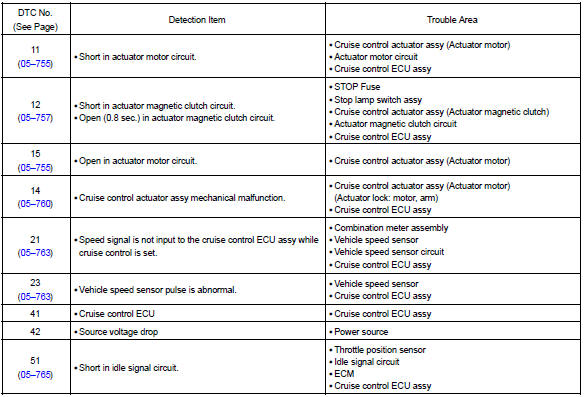
Toyota Corolla (E120): Diagnostic trouble code chart
Diagnostic trouble code chart
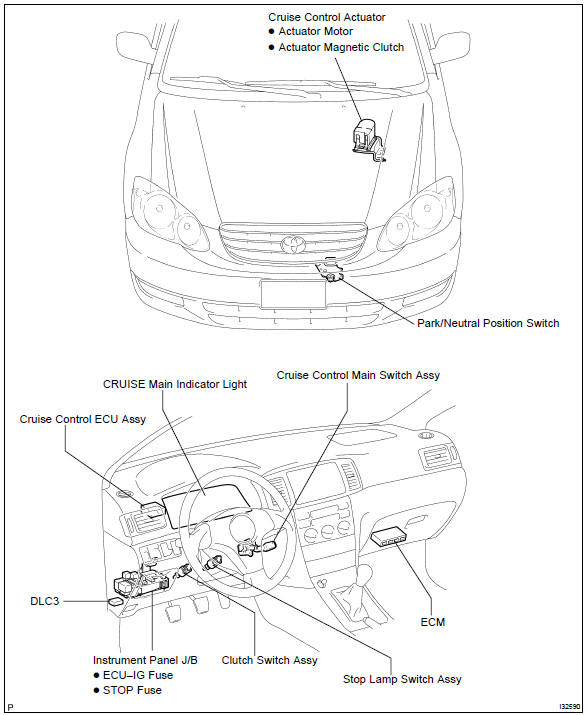
Location


Other materials:
Front no.1 Speaker assy
Replacement
Hhint: components:
1. Remove front armrest assy lh
2. Remove power window regulator master switch assy (w/ power window)
3. Remove front armrest base panel upper lh (w/o power window)
4. Remove front door window regulator handle assy (w/o power window)
5. Remove front door lowe ...
Steering wheel
Adjustment procedure
1. Hold the steering wheel and
push the lever down.
2. Adjust to the ideal position by
moving the steering wheel
horizontally and vertically.
After adjustment, pull the lever up
to secure the steering wheel.
WARNING
■Caution while driving
Do not adjust the steering wheel
wh ...
Driving
► Automatic transmission or continuously
variable transmission
1 With the brake pedal depressed, shift the shift lever to D.
(, 174, 176)
2 Release the parking brake.
3 Gradually release the brake pedal and gently depress the accelerator pedal to
accelerate the vehicle.
► ...