
Toyota Corolla (E120) 2002–2008 Repair Manual / Diagnostics / ABS with EBD system / Diagnostic trouble code chart
Toyota Corolla (E120): Diagnostic trouble code chart
Notice
: when removing the part, turn the ignition switch to off.
Hint
: using sst 09843–18040, it connect the terminal tc and cg of dlc3.
If any abnormality is not found when inspecting parts, inspect the ecu and ground points for poor contact.
If a malfunction code is displayed during the dtc check, check the circuit listed that code. For details of each code, turn to the page referred to under the ”” for respective ”dtc no.” In the dtc chart.
When 2 or more dtc’s are recorded, and the problem is not identified, perform circuit inspection of the other dtc’s.
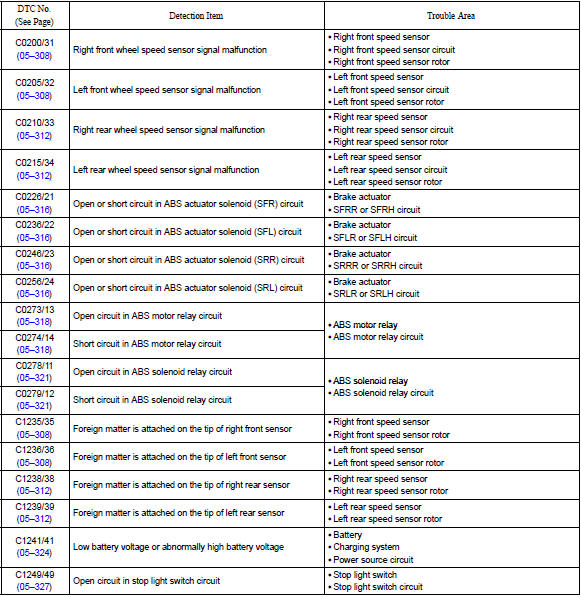

Dtc of speed sensor check function:
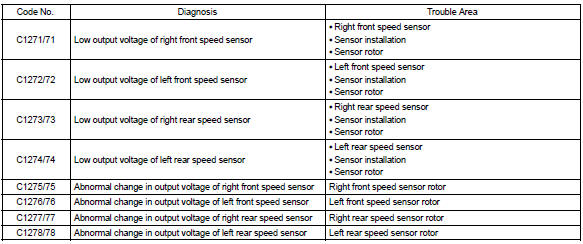


Other materials:
Inspection procedure
Hint:
if dtcs p0115, p0116, p0117, p0118 and p0125 are output
simultaneously, the engine coolant temperature
sensor circuit may be open or short. Perform the troubleshooting of dtc
p0115, p0117 or
p0118 first.
Read freeze frame data using the hand-held tester or the obd ii scan
to ...
Tire information
Typical tire symbols
► Full-size tire
► Compact spare tire
1 Tire size
2 DOT and Tire Identification Number (TIN)
3 Uniform tire quality grading
For details, see “Uniform Tire Quality Grading” that follows.
4 Location of treadwear indicators
5 Tire ply composition and ma ...
Inspection procedure
1 Input signal check
See input signal check on page 05–745.
check the indicator light operation when each of the set/
coast, resume/accel and cancel is turned on.
Ok:
set/coast, resume/accel switch:
the signals shown in the table on the left should be
output when each switch is ...