
Toyota Corolla (E170) 2014–2019 Owners Manual / Interior features / Connecting Bluetooth® (Multimedia system) / Preparations to use wireless communication / Device registration/connection flow
Toyota Corolla (E170): Device registration/connection flow
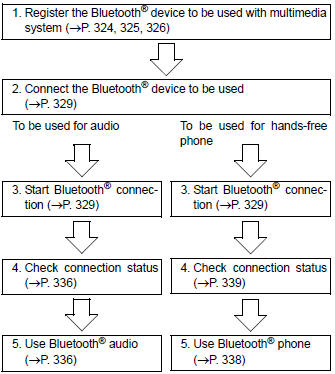


Other materials:
Safety Connect
*: If equipped
Safety Connect is a subscription-
based telematics
service that uses Global
Positioning System (GPS)
data and embedded cellular
technology to provide
safety and security features
to subscribers. Safety Connect
is supported by Toyota's
designated response
center, which operates 24
hour ...
Overhaul
Hint:
installation is in the reveres order of the removal. But the
installation is indicated only when it has a
point.
In the rh side, work in the same procedure as in the lh side.
1. Remove rear armrest assy lh
Using a screwdriver, remove the rear armrest.
Hint:
tape the s ...
Setting the vehicle speed
1 Press the “ON-OFF” button to activate the cruise control.
Cruise control indicator will come on.
Press the button again to deactivate the cruise control.
2 Press the “ON-OFF” button to activate the cruise control.
Cruise control indicator will come on.
Press the button again to deac ...