
Toyota Corolla (E210): Exterior
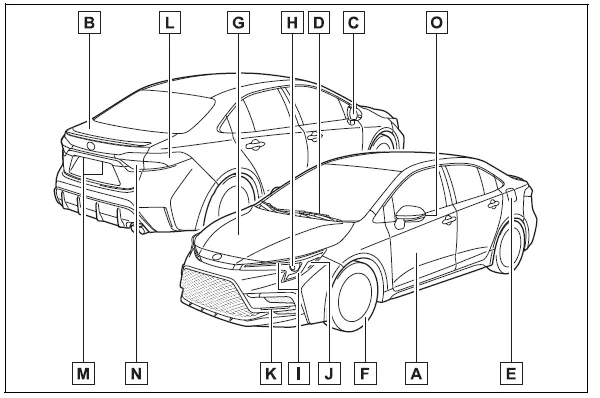
- Doors Locking/unlocking Opening/closing the side windows Locking/unlocking by using the mechanical key*1 Warning messages
- Trunk
Opening from inside
Opening from outside
Warning messages - Outside rear view mirrors
Adjusting the mirror angle
Folding the mirrors
Defogging the mirrors*2 - Windshield wipers Precautions for winter season To prevent freezing (windshield wiper de-icer)*2
- Fuel filler door Refueling method Fuel type/fuel tank capacity
- Tires Tire size/inflation pressure Winter tires/tire chains Checking/rotation/tire pressure warning system*2 Coping with flat tires
-
Hood
Opening
Engine oil
Coping with overheating - Headlights/daytime running lights
- Turn signal lights/parking lights
- Front side marker lights
- LED accent lights*2
- Stop lights/tail lights/rear side marker lights/turn signal lights
- License plate lights
- Tail lights*2
Back-up lights
Shifting the shift position to R - Side turn signal lights*2
*1:Vehicles with a smart key system *2:If equipped


Other materials:
RSA (Road Sign Assist)
The RSA system detects
specific road signs using
the front camera and/or navigation
system (when speed
limit information is available)
and warns the driver
via displays and buzzers.
WARNING
■For safe use
Driving safely is solely the
responsibility of the driver. Pay
careful attention to the su ...
On–vehicle inspection
1. Inspect w/receiver condenser assy
if a fin of the w/receiver condenser assy is dirty, clean it with
water and dry it with compressor air.
Notice:
do not damage the fin of the w/receiver condenser assy.
if a fin of the w/receiver condenser assy is bent, make it
straig ...
Adjustment
Hint:
in the rh side, work in the same procedure as in the lh
side.
Since the centering bolt is used as a door side hinge bolt,
the door hinge cannot be adjusted with it on. Substitute
the bolt with washer for the centering bolt.
1. Inspect front door panel sub–assy lh
Che ...