
Toyota Corolla (E210) 2019-2026 Owners Manual / Pictorial index / Instrument panel
Toyota Corolla (E210): Instrument panel
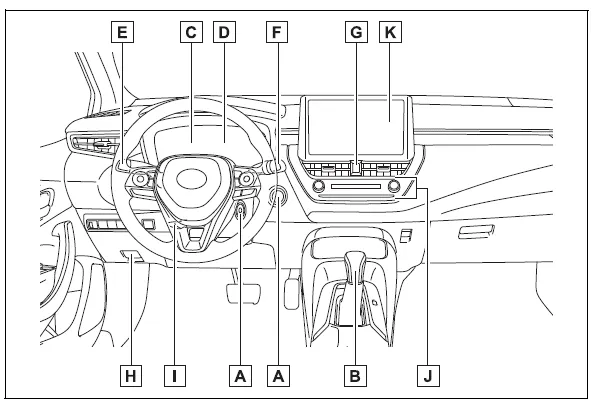
- Engine switch Starting the engine/changing the positions*1 Starting the engine/changing the modes*2 Emergency stop of the engine When the engine will not start Warning messages
- Shift lever
Changing the shift position
Precautions for towing
When the shift lever does not move - Meters Reading the meters/adjusting the instrument panel light Warning lights/indicator lights When a warning light turns on
- Multi-information display
Display
When a warning message is displayed - Turn signal lever Headlight switch Headlights/parking lights/tail lights/side marker lights/daytime running lights/LED accent lights*3
- Windshield wiper and washer switch
Usage
Adding washer fluid - Emergency flasher switch
- Hood lock release lever
- Tilt and telescopic steering lock release lever
- Air conditioning system
Usage
Rear window defogger - Audio system*4
*1:Vehicles without a smart key system
*2:Vehicles with a smart key system
*3:If equipped
*4:Refer to "MULTIMEDIA OWNER'S MANUAL".


Other materials:
Disposal
1. Dispose shock absorber assy front lh
fully extend the shock absorber piston rod.
using a drill, make a hole in the cylinder as shown in the
illustration to discharge the gas inside.
Caution:
when drilling, chips may fly out, work carefully.
The gas is colorless, o ...
SRS airbags
The SRS airbags inflate when the vehicle is subjected to certain
types of severe impacts that may cause significant injury
to the occupants. They work together with the seat belts to
help reduce the risk of death or serious injury.
SRS airbag system
■ Location of the SRS airbags
SRS front airbags ...
Vehicle lift and support locations
1. Notice about vehicle condition when jacking up
As a rule, the vehicle must be unloaded when jacking up. Never jack up
or lift up the vehicle loaded
with things of heavy weight.
when removing any parts of heavy weight like the engine and
transmission, the center of gravity of
...