
Toyota Corolla (E170) 2014–2019 Owners Manual / Maintenance and care / Do-it-yourself maintenance / Wireless remote control/electronic key battery
Toyota Corolla (E170): Wireless remote control/electronic key battery
Replace the battery with a new one if it is depleted.
You will need the following items:
● Flathead screwdriver ● Small flathead screwdriver ● Lithium battery CR2016 (vehicles without a smart key system), or CR2032 (vehicles with a smart key system)
Replacing the battery
► Vehicles without a smart key system 1 Remove the cover.
To prevent damage to the key, cover the tip of the screwdriver with a rag.
To prevent the buttons from being disassembled, face the button surface downward.
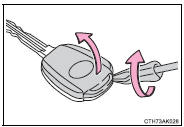
2 Remove the module.
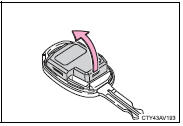
3 Open the case cover using a coin protected with tape etc.
and remove the depleted battery using a small flathead screwdriver.
Insert a new battery with the “+” terminal facing up.
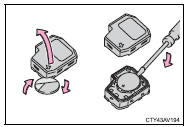
► Vehicles with a smart key system
1 Take out the mechanical key.
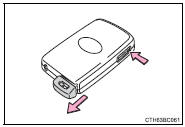
2 Remove the cover.
To prevent damage to the key, cover the tip of the screwdriver with a rag.
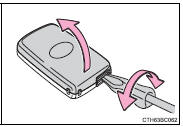
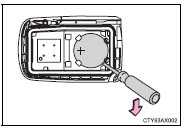
3 Remove the depleted battery.
Insert a new battery with the “+” terminal facing up.
■Use a CR2016 (vehicles without a smart key system) or CR2032 (vehicles with a smart key system) lithium battery
●Batteries can be purchased at your Toyota dealer, local electrical appliance shops or camera stores.
●Replace only with the same or equivalent type recommended by the manufacturer.
●Dispose of used batteries according to local laws.
■If the key battery is depleted
The following symptoms may occur:
●The smart key system (if equipped) and wireless remote control will not function properly.
●The operational range will be reduced.
CAUTION
■Removed battery and other parts
These parts are small and if swallowed by a child, they can cause choking.
Keep away from children. Failure to do so could result in death or serious injury.
NOTICE
■For normal operation after replacing the battery
Observe the following precautions to prevent accidents:
●Always work with dry hands.
Moisture may cause the battery to rust.
●Do not touch or move any other component inside the remote control.
●Do not bend either of the battery terminals.


Other materials:
Circuit description
Refer to dtc p0130
Dtc no.
Dtc detection condition
Trouble area
P0133
After engine has been warmed up, if response time that heated
oxygen sensor’s output voltage reaches from rich to lean.
Or from lean to rich, is 0.6 Second or more during idling.
...
Wiper & washer
Preparation
Sst
Recomended tools
Equipment
...
Seat heaters
Press the switch.
1 High temperature
2 Low temperature
The indicator light comes on when the switch is on.
■The seat heaters can be used when
► Vehicles without a smart key system
The engine switch is in the “ON” position.
►Vehicles with a smart key system
The engine ...