
Toyota Corolla (E120): Cooling
Service data
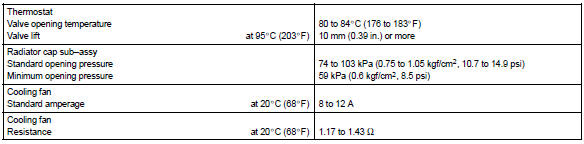
Torque specification



Other materials:
Inspection procedure
1 Check side squib(lh) circuit(airbag sensor assy center – front
seat airbag assy lh)
Disconnect the negative (–) terminal cable from the battery,
and wait at least for 90 seconds.
disconnect the connectors between the airbag sensor
assy center and the front seat airbag assy ...
Spiral cable sub–assy
Components
Replacement
Hint: components:
1. Precaution
2. Disconnect battery negative terminal
3. Place front wheels facing straight ahead
check that the front wheels are facing straight ahead.
4. Remove horn button assy
5. Remove steering wheel assy
sst 09950–50013 ...
Front axle lh hub bolt
Replacement
Hint: components:
1. Remove front wheel
2. Separate front disc brake caliper assy lh
3. Remove front disc
4. Remove front axle lh hub bolt
Using sst and a hammer handle or an equivalent, remove
the lh hub bolt.
Sst 09628–10011
5. Install front axle lh hub bolt
...