
Toyota Corolla (E120) 2002–2008 Repair Manual / Diagnostics / ABS with EBD system / Open circuit in stop light switch
circuit / Circuit description
Toyota Corolla (E120): Circuit description

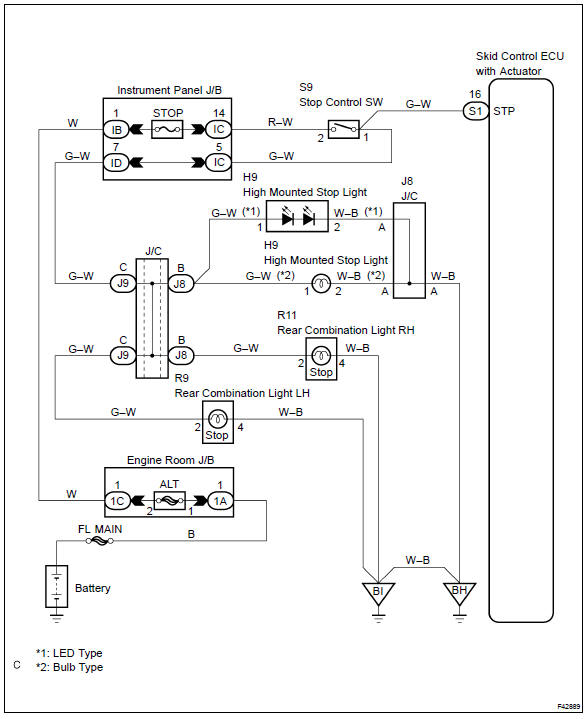
Wiring diagram


Other materials:
If your vehicle overheats
The following may indicate that your vehicle is overheating.
● Vehicles without a multi-information display: The high engine coolant temperature
warning light comes on or a loss of power is experienced.
Vehicles with a multi-information display: The engine coolant temperature gauge&n ...
Playing an audio CD and MP3/WMA/AAC discs (Multimedia system)
CD player operation
Insert disc or select “CD” on the audio source selection screen with a disc
inserted to begin listening to a CD.
Audio control screen
Pressing the “AUDIO” button displays the audio control screen from any screens
of the selected source.
1 Audio source selection sc ...
Inspection procedure
Hint:
read freeze frame data using the hand-held tester or the obd ii scan tool.
Freeze frame data records the
engine conditions when a malfunction is detected. When troubleshooting, it is
useful for determining whether
the vehicle was running or stopped, the engine was warmed up or not, the ...