
Toyota Corolla (E120) 2002–2008 Repair Manual / Audio & visual / Antenna cord sub–assy
Toyota Corolla (E120): Antenna cord sub–assy
Replacement
Hint
: components:
1. Remove instrument panel sub–assy upper
Hint
:
- refer to the procedure until the step, ”remove instrument panel sub–assy upper” of instrument panel sub–assy lower.
- Remove the related parts as long as the antenna cord sub–assy can be removed.
2. Remove visor holder
Hint
:
- refer to the procedure until the step, ”remove visor holder” of roof headlining assy.
- Remove the parts related to the roof headlining assy in the range that antenna cord can be cut off.
3. Remove sun roof opening trim moulding (w/ sliding roof)
4. Disconnect antenna cord sub–assy
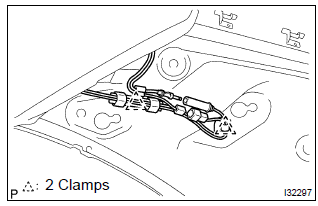
- Rear side: disconnect the connector and antenna cord plug.
- rear side: remove the 2 clamps.
- Front side: remove the 9 clamps.
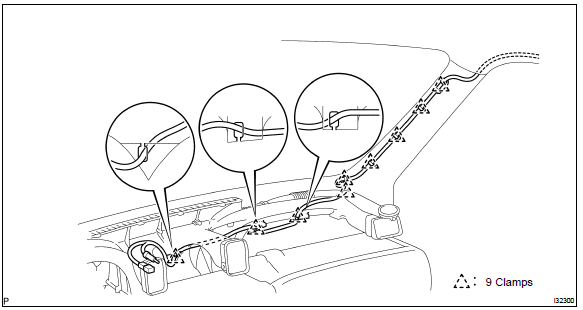
5. Remove roof headlining assy
Notice
: do not bend the roof headlining assy.
6. Remove antenna cord sub–assy
- remove the antenna cord sub–assy from the roof headlining.
7. Install antenna cord sub–assy
- tape the antenna cord sub–assy at the position of the roof headlining shown in the illustration.
Notice
:
- the antenna cord sub–assy should come to the center of the tape (100 mm(3.94 In.) X 25 mm(0.98 In.)) When taped.
- Try not to touch the adhesive side of the tape when taping.
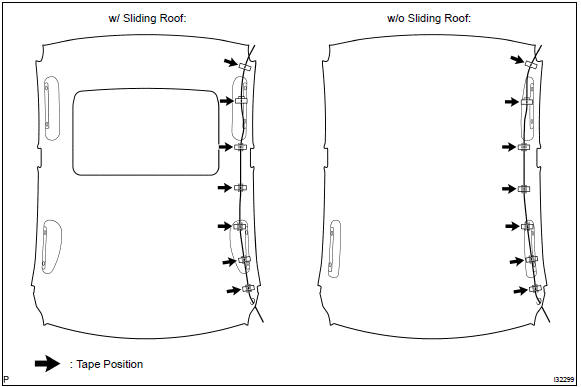
- Install the roof headlining assy .
- engage the 9 clamps at the front side of antenna cord.
- connect the plug and connector at the rear side of antenna cord.
8. Install rear seat back assy (fixed type rear seat)
9. Install rear seat back assy (separated type rear seat)
10. Install bench type rear seat cushion assy( or 72–8)
11. Install instrument panel sub–assy upper
Hint
: refer to the procedure until the step, ”install instrument panel sub–assy upper” of instrument panel sub–assy lower.


Other materials:
Using the key (vehicles
without a smart key system
and with a wireless
remote control function)
Releasing
To release the key, press the button
Folding
To stow the key, press the button
then fold the key.
Using the mechanical key
(vehicles with a smart key
system)
To take out the mechanical key,
slide the release button and take
the key out.
The mechanical key can only be
inserted in o ...
How to proceed with troubleshooting
The hand–held tester can be used at step 3, 4, 5, 7, 10.
1 Vehicle brought to workshop
2 Customer problem analysis
3 Connect hand–held tester to dlc3
Hint:
if the display indicates a communication fault in the tool, inspect dlc3.
4 Check dtc and freeze frame data
Hint:
record or pr ...
How to register a Bluetooth® device
1 Display the “Bluetooth* Setup” screen. *: Bluetooth is a registered trademark
of Bluetooth SIG, Inc.
2 Select “Add”.
3 When this screen is displayed, search for the device name displayed on this
screen on the screen of your Bluetooth® device.
For details about operating the Bluetoo ...