
Toyota Corolla (E210) 2019-2026 Owners Manual / Maintenance and care / Engine compartment / Adding engine oil
Toyota Corolla (E210): Adding engine oil
■ Checking the oil type and preparing the item needed
Make sure to check the oil type and prepare the items needed before adding oil.
- Engine oil selection
- Oil quantity (Low level mark
 Refill upper limit mark)
1.6 qt. (1.5 L, 1.3 Imp. qt.)
Refill upper limit mark)
1.6 qt. (1.5 L, 1.3 Imp. qt.) - Item
Clean funnel
■ Adding engine oil
If the oil level is below or near the low level mark, add engine oil of the same type as that already in the engine.
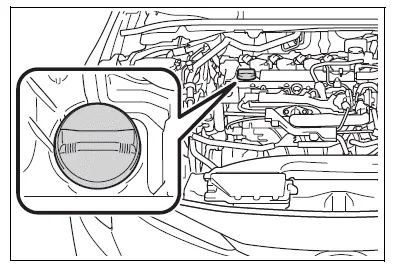
1. Remove the oil filler cap by turning it counterclockwise.
2. Add engine oil slowly, checking the dipstick.
Make sure that the oil level does not exceed the refill upper limit mark and is between the low level mark and refill upper limit mark.
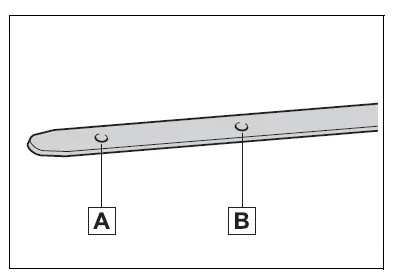
- Low level mark
- Refill upper limit mark
The shape of the dipstick may differ depending on the type of vehicle engine.
3. Install the oil filler cap by turning it clockwise.
WARNING
■Used engine oil
- Used engine oil contains potentially harmful contaminants which may cause skin disorders such as inflammation and skin cancer, so care should be taken to avoid prolonged and repeated contact. To remove used engine oil from your skin, wash thoroughly with soap and water.
- Dispose of used oil and filters
only in a safe and acceptable
manner. Do not dispose of used
oil and filters in household trash,
in sewers or onto the ground.
Call your Toyota dealer, service station or auto parts store for information concerning recycling or disposal.
- Do not leave used engine oil within the reach of children.
NOTICE
■When replacing the engine oil
- Be careful not to spill engine oil on the vehicle components.
- Avoid overfilling, or the engine could be damaged.
- Check the oil level on the dipstick every time you refill the vehicle.
- Be sure the engine oil filler cap is properly tightened.


Other materials:
Steering wheel audio switches
Some audio features can be controlled using the switches on the steering wheel.
Operation may differ depending on the type of audio system or navigation system.
For details, refer to the manual provided with the audio system or navigation system.
Operating the audio system using the steering whe ...
Safety information for
Safety Connect
Important! Read this information
before using Safety Connect.
■ Exposure to radio frequency
signals
The Safety Connect system
installed in your vehicle is a
low-power radio transmitter and
receiver. It receives and also
sends out radio frequency (RF)
signals.
In August 1996, the Federal
Communica ...
Registering a Bluetooth® phone for the first time
To use the hands-free system, it is necessary to register a Bluetooth® phone
with the system.
Once the phone has been registered, it is possible to use the hands-free system.
For details about registering a Bluetooth® device
1 Turn the Bluetooth® connection setting of your cellular phone on. ...