
Toyota Corolla (E170) 2014–2019 Owners Manual / Instrument cluster / Gauges and meters (drive monitor display)
Toyota Corolla (E170): Gauges and meters (drive monitor display)
The displayed content may differ depending on the type of meter.
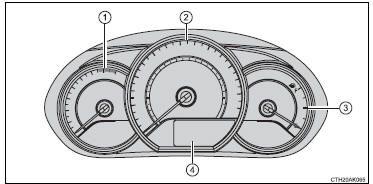
1 Tachometer
Displays the engine speed in revolutions per minute.
2 Speedometer
3 Fuel gauge
4 Drive monitor display
The drive monitor display presents the driver with a variety of drivingrelated data
including the current outside air temperature.
- Drive monitor display
- Instrument panel light control
- Trip information
- Eco Driving Indicator Light customization (except vehicles with a manual transmission)


Other materials:
Amplifier antenna assy
Replacement
Hint: components:
Remove roof headlining assy
Notice:
do not bend the roof headlining assy.
Hint:
refer to the procedure from ”remove roof headlining assy” of roof
headlining assy.
Remove the related parts as long as the amplifier antenna assy can be
removed. ...
Changing audio source
1 Press the “AUDIO” button to display the audio source selection screen.
If the audio source selection screen is not displayed, press the “AUDIO” button
again.
2 Select the desired audio source.
1 Select the desired audio source then
or
to reorder.
...
Editing the contact data
For PBAP compatible Bluetooth® phones, this function is available when “Automatic
Contact/History Transfer” is set to off. 1 Select “Edit Contact”.
2 Select the desired contact.
3 Select corresponding to the desired name or number.
► For editing the name
Follow the steps in “R ...