
Toyota Corolla (E170) 2014–2019 Owners Manual / Instrument cluster / Gauges and meters (drive monitor display) / Instrument panel light control
Toyota Corolla (E170): Instrument panel light control
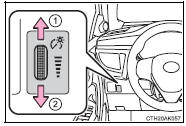
When the tail lights are on, the brightness of the instrument panel lights can be adjusted. (On vehicles with an automatic light control system, the instrument panel lights can be adjusted when the surrounding area is dark and the tail lights are on.) The brightness of the clock light can be adjusted regardless of whether the tail lights are on or off.
1 Brighter
2 Darker


Other materials:
Continuously variable transmission
(vehicles without paddle
shift switches)
Select the shift position
depending on your purpose
and situation.
Shift position purpose
and functions
P - Parking the vehicle/
starting the engine
R - Reversing
N - Neutral
(Condition in which the
power is not transmitted)
D - Normal driving*
B - Applying moderate
engine braking driving
down hills ...
Exterior
Doors
Locking/unlocking
Opening/closing the side windows
Locking/unlocking by using the mechanical key*1
Warning messages
Trunk
Opening from inside
Opening from outside
Warning messages
Outside rear view mirrors
Adjusting the mirror angle
Folding the mirrors
Defogging the mirrors*2
...
For your information
Main Owner’s Manual
Please note that this manual applies to all models and explains all equipment,
including options. Therefore, you may find some explanations for equipment not installed
on your vehicle.
All specifications provided in this manual are current at the time of printing.
Howeve ...