
Toyota Corolla (E120): Dtc check/clear
Notice
:
- if there is no dtc in the normal mode, check the pending fault code using the continuous test results function (mode 7 for sae j1979) on the obd ii scan tool or the hand–held tester.
- Hand–held tester only: when the diagnosis system is switched from the normal mode to the check mode, all the dtcs and freeze frame data recorded in the normal mode will be erased. So before switching modes, always check the dtcs and freeze frame data, and then write them down.
1. Check dtc (using the obd ii scan tool or hand–held tester)
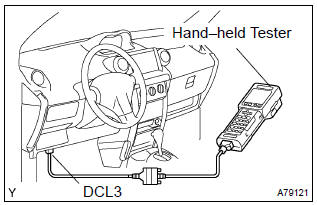
- Connect the obd ii scan tool or hand–held tester to the dlc3.
- turn the ignition switch on.
- use the obd ii scan tool or the hand–held tester to check
the dtcs and freeze frame data and then write them
down. If you need help with the obd ii scan tool, refer to
the scan tool’s instruction book.
If there is no dtc in the normal mode, check the pending fault code using the continuous test results function on the obd ii scan tool or the hand–held tester.
- to confirm the details of the dtcs.
Notice
:
- when simulating a symptom with the obd ii scan tool (excluding hand–held tester) to check the dtcs, use the normal mode. For code on the dtc chart subject to the ”2 trip detection logic”, perform either of the following actions.
- Turn the ignition switch off after the symptom is simulated once. Then repeat the simulation process again. When the problem has been simulated twice, the mil lights up and the dtcs are recorded in the ecm.
- Check the pending fault code using the continuous test results function on the obd ii scan tool.
2. Clear dtc (using the obd ii scan tool or hand–held tester)
- Connect the obd ii scan tool or the hand–held tester to the dlc3.
- turn the ignition switch on.Operate the obd ii scan tool or the hand–held tester to erase the codes. All the dtcs and freeze frame data will be erased. (See the obd ii scan tool’s instruction book for operating instructions.)
3. Clear dtc (not using the obd ii scan tool or hand– held tester)
- Disconnect the battery terminal or remove the efi fuse from the engine room r/b for more than 60 seconds.


Other materials:
Engine mechanical
Preparation
Sst
Recomended tools
Ssm
Equipment
Exhaust
Preparation
Equipment
...
Check and replace ecu
Notice:
start an inspection of the connector from the backside
of the connector on the wire harness side with
the connector connected to the ecu.
When no measurement condition is specified, perform
the inspection with the engine stopped and also
the ignition switch on.
First check the ec ...
Adjustment
1. Inspect and adjust clutch pedal sub–assy
Turn over the floor carpet.
check that the pedal height is correct.
Pedal height from asphalt sheet:
135.8 – 145.8 Mm (5.346 – 5.740 In.)
adjust the pedal height.
Loosen the lock nut and turn the stopper bolt until
...