
Toyota Corolla (E170) 2014–2019 Owners Manual / Operation of each component / Opening and closing the windows / Power windows / Window lock switch
Toyota Corolla (E170): Window lock switch
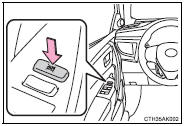
Press the switch to lock the passenger window switches.
Use this switch to prevent children from accidentally opening or closing a passenger window.
■The power windows can be operated when
► Vehicles without a smart key system The engine switch is in the “ON” position.
► Vehicles with a smart key system The engine switch is in IGNITION ON mode.
■Operating the power windows after turning the engine off
► Vehicles without a smart key system The power windows can be operated for approximately 45 seconds even after the engine switch is turned to the “ACC” or “LOCK” position. They cannot, however, be operated once either front door is opened.
► Vehicles with a smart key system The power windows can be operated for approximately 45 seconds even after the engine switch is turned to ACCESSORY mode or turned off. They cannot, however, be operated once either front door is opened.
■Jam protection function (driver’s window onl
y) If an object becomes caught between the window and the window frame, window travel is stopped and the window is opened slightly.
■When the power window does not close normally (driver’s window only)
If the jam protection function is operating abnormally and a window cannot be closed, perform the following operations using the power window switch on the driver’s door.
●Vehicles without a smart key system: After stopping the vehicle, the window can be closed by holding the power window switch in the one-touch closing position while the engine switch is turned to the “ON” position.
Vehicles with a smart key system: After stopping the vehicle, the window can be closed by holding the power window switch in the one-touch closing position while the engine switch is turned to IGNITION ON mode.
●If the window still cannot be closed even by carrying out the operation as explained above, initialize the function by performing the following procedure.
1 Hold the power window switch in the one-touch closing position. Continue holding the switch for a further 6 seconds after the window has closed.
2 Hold the power window switch in the one-touch opening position. Continue holding the switch for a further 2 seconds after the window has opened completely.
3 Hold the power window switch in the one-touch closing position once again. Continue holding the switch for a further 2 seconds after the window has closed.
If you release the switch while the window is moving, start again from the beginning.
If the window continues to close but then re-open slightly even after performing the above procedure correctly, have the vehicle inspected by your Toyota dealer.
CAUTION
Observe the following precautions.
Failure to do so may result in death or serious injury.
■Closing the windows
●Check to make sure that all passengers do not have any part of their body in a position where it could be caught when a window is being operated.
●Do not allow children to operate the power windows.
Closing a power window on someone can cause serious injury, and in some instances, even death.
■Jam protection function (driver’s window only)
●Never use any part of your body to intentionally activate the jam protection function.
●The jam protection function may not work if something gets caught just before the window fully closes.


Other materials:
Oxygen / af sensor heater monitor
Preconditions
The monitor will not run unless:
mil is off
drive pattern
connect the obd ii scan tool to the dlc3 to check monitor status
and preconditions.
Start the engine and allow it to idle for 9 minutes.
Drive the vehicle at 25 mph (40 km ...
Wireless charger (if
equipped)
A portable device, such as a
smartphone or mobile battery,
can be charged by just placing it
on the charging area, provided
the device is compatible with the
Qi wireless charging standard
created by the Wireless Power
Consortium.
The wireless charger cannot be
used with a portable device that is la ...
Key confinement prevention function does not work
properly (unlock warning switch circuit)
Circuit description
The unlock warning switch turns on when the key is inserted in the ignition
key cylinder and the door courtesy
switch turns on when the driver’s door is opened, and the integration relay
monitors both switches conditions.
According to these switches conditions, the int ...