
Toyota Corolla (E170) 2014–2019 Owners Manual / When trouble arises / Steps to take in an emergency / If a warning light turns on or a warning buzzer sounds / Warning light and warning buzzer list
Toyota Corolla (E170): Warning light and warning buzzer list
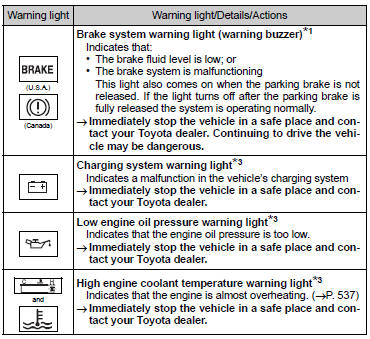
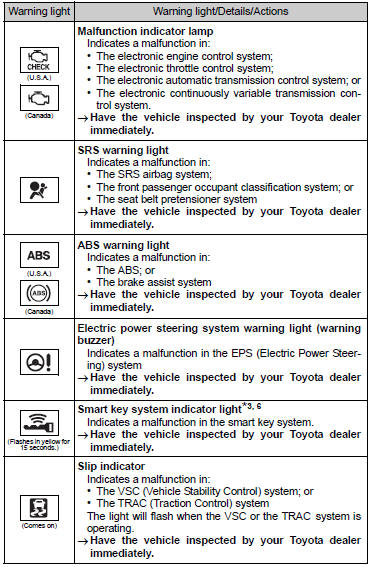
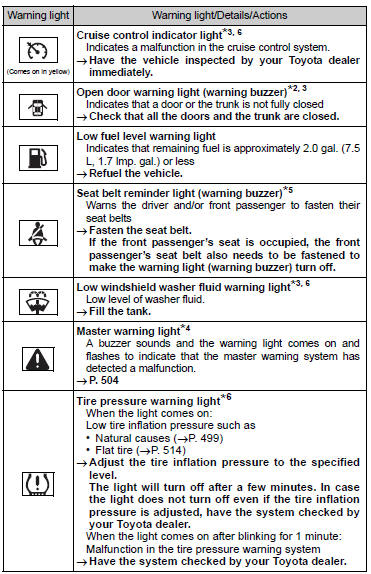
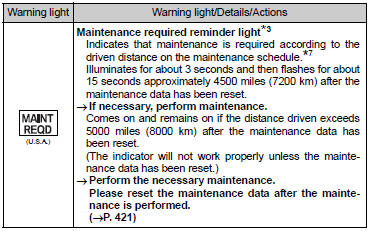
*1: Parking brake engaged warning buzzer: *2: Open door warning buzzer: *3: Vehicles with a drive monitor display *4: Vehicles with a multi-information display *5: Driver’s seat belt buzzer: Vehicles without a smart key system: The driver’s seat belt buzzer sounds to alert the driver that his or her seat belt is not fastened. Once the engine switch is turned to the “ON” position, the buzzer sounds for 6 seconds. If the vehicle reaches a speed of 12 mph (20 km/h), the buzzer sounds once.
If the seat belt is still unfastened after 30 seconds, the buzzer will sound intermittently for 10 seconds. Then, if the seat belt is still unfastened, the buzzer will sound in a different tone for 20 more seconds.
Vehicles with a smart key system: The driver’s seat belt buzzer sounds to alert the driver that his or her seat belt is not fastened. Once the engine switch is turned to IGNITION ON mode, the buzzer sounds for 6 seconds.
If the vehicle reaches a speed of 12 mph (20 km/h), the buzzer sounds once. If the seat belt is still unfastened after 30 seconds, the buzzer will sound intermittently for 10 seconds. Then, if the seat belt is still unfastened, the buzzer will sound in a different tone for 20 more seconds.
Front passenger’s seat belt buzzer: The front passenger’s seat belt buzzer sounds to alert the front passenger that his or her seat belt is not fastened. The buzzer sounds once if the vehicle reaches a speed of 12 mph (20 km/h). If the seat belt is still unfastened after 30 seconds, the buzzer will sound intermittently for 10 seconds.
Then, if the seat belt is still unfastened, the buzzer will sound in a different tone for 20 more seconds.
*6: If equipped
*7: Refer to the separate “Scheduled Maintenance Guide” or “Owner’s Manua


Other materials:
On–vehicle inspection
1. Install lspv gauge (sst) and bleed air
remove the bleeder plugs from the front and rear brake cylinder.
install the lspv gauge (sst), and bleed the air.
Sst 09709–29018
2. Raise master cylinder pressure and check rear wheel cylinder pressure
Hint:
when inspectin ...
Wiring diagram
1 Inspect terminal voltage(pi)
(a) turn
Turn the ignition switch to on.
measure voltage between terminal 5 (pi) of cruise control
ecu assy and body ground, when the cruise control main
switch button is on and off.
Ok:
2 Inspect combination meter assy
3 Check harn ...
On–vehicle inspection
1. Inspect speedometer
check the operation.
Using a speedometer tester, inspect the speedometer fro allowable
indication error and check
the operation of the odometer.
Reference:
Notice:
tire wear and tire over or under inflation will increase the indication error.
...