
Toyota Corolla (E210): Meter display
■ Locations of gauges and meters
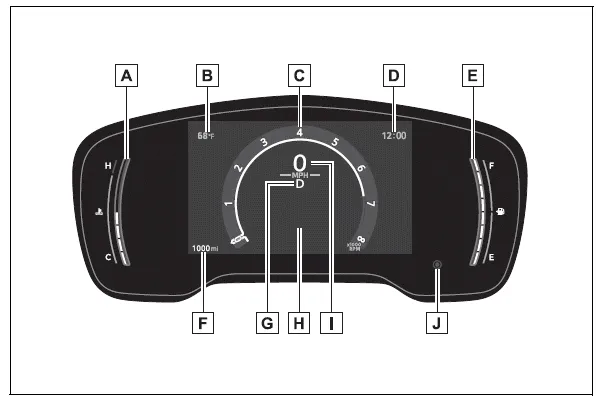
- Engine coolant temperature gauge Displays the engine coolant temperature
- Outside temperature
Displays the outside temperature within the range of -40ºF (-40ºC) to 140ºF (60ºC) - Analog speedometer/Tachometer This setting can be changed on the setting screen.
- Clock
- Fuel gauge
Displays the quantity of fuel remaining in the tank - Odometer and trip meter display
- Shift position indicator
- Multi-information display Presents the driver with a variety of vehicle data Displays warning messages if a malfunction occurs
- Digital speedometer
- Display change button
■Outside temperature display
- In the following situations, the correct
outside temperature may not
be displayed, or the display may
take longer than normal to
change:
- When stopped, or driving at low speeds (less than 12 mph [20 km/h] )
- When the outside temperature has changed suddenly (at the entrance/exit of a garage, tunnel, etc.)
- When "--" or "E" is displayed, the
system may be malfunctioning.
Take your vehicle to your Toyota dealer.
■Customization
The gauges and meters can be customized
in of the multi-information
display.
of the multi-information
display.
WARNING
■The information display at low temperatures
Allow the interior of the vehicle to warm up before using the liquid crystal information display. At extremely low temperatures, the information display monitor may respond slowly, and display changes may be delayed.
For example, there is a lag between the driver's shifting and the new gear number appearing on the display. This lag could cause the driver to downshift again, causing rapid and excessive engine braking and possibly an accident resulting in death or injury.
NOTICE
■To prevent damage to the engine and its components
- Do not let the indicator needle of the tachometer enter the red zone, which indicates the maximum engine speed.
- The engine may be overheating if the engine coolant temperature gauge is in the red zone (H). In this case, immediately stop the vehicle in a safe place, and check the engine after it has cooled completely.


Other materials:
Eco drive mode (if equipped)
Press the switch.
Suitable for enhancing the fuel economy, because the torque corresponding to
the accelerator pedal depression amount can be generated more smoothly than it is
in normal conditions and the operation of the air conditioning system (heating/cooling)
will be minimized.
Press th ...
Inspection procedure
1 Check security indicator light
Remove the security indicator.
check the indicator light, as shown in the illustration and
table.
Standard:
2 Check wire harness (tvip ecu security indicator)
Disconnect the tvip ecu and security indicator connectors.
...
Inspection
1. Inspect front seat inner belt assy lh
When fastening the seat belt (buckle switch on).
Inspect the continuity and resistance between the
terminals.
Standard:
If the result is not as specified, replace the inner belt.
When releasing the seat belt (buckle switch ...