
Toyota Corolla (E210) 2019-2026 Owners Manual / Vehicle specifications / Specifications / Tire information
Toyota Corolla (E210): Tire information
Typical tire symbols
Full-size tire
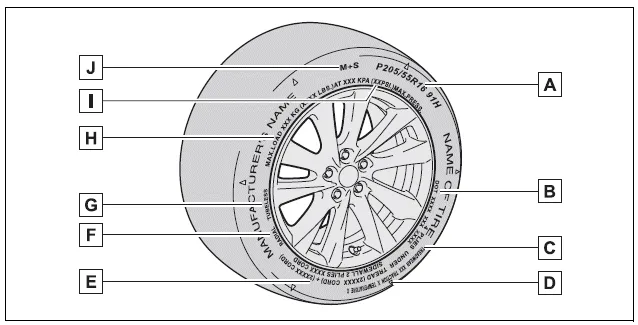
- Tire size
- DOT and Tire Identification Number (TIN)
- Uniform tire quality grading For details, see "Uniform Tire Quality Grading" that follows.
- Location of treadwear indicators
- Tire ply composition and materials Plies are layers of rubber-coated parallel cords. Cords are the strands which form the plies in a tire.
- Radial tires or bias-ply tires A radial tire has "RADIAL" on the sidewall. A tire not marked "RADIAL" is a bias-ply tire.
- TUBELESS or TUBE TYPE A tubeless tire does not have a tube and air is directly put into the tire. A tube type tire has a tube inside the tire and the tube maintains the air pressure.
- Load limit at maximum cold tire inflation pressure
- Maximum cold tire inflation pressure This means the pressure to which a tire may be inflated.
- Summer tires or all season tires
An all season tire has "M+S" on the sidewall. A tire not marked "M+S" is a summer tire.
Compact spare tire
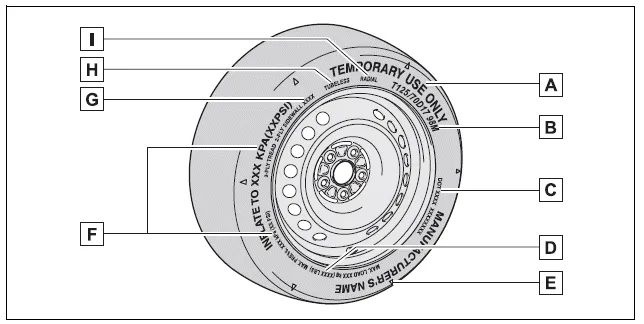
- "TEMPORARY USE ONLY" A compact spare tire is identified by the phrase "TEMPORARY USE ONLY" molded on its sidewall. This tire is designed for temporary emergency use only.
- Tire size
- DOT and Tire Identification Number (TIN)
- Load limit at maximum cold tire inflation pressure
- Location of treadwear indicators
- Maximum cold tire inflation pressure This means the pressure to which a tire may be inflated.
- Tire ply composition and materials Plies are layers of rubber-coated parallel cords. Cords are the strands which form the plies in a tire.
- TUBELESS or TUBE TYPE A tubeless tire does not have a tube and air is directly put into the tire. A tube type tire has a tube inside the tire and the tube maintains the air pressure.
- Radial tires or bias-ply tires A radial tire has "RADIAL" on the sidewall. A tire not marked "RADIAL" is a bias-ply tire.
Typical DOT and Tire Identification Number (TIN)
Type A
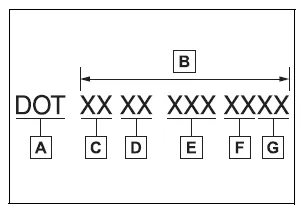
- DOT symbol*
- Tire Identification Number (TIN)
- Tire manufacturer's identification mark
- Tire size code
- Manufacturer's optional tire type code (3 or 4 letters)
- Manufacturing week
- Manufacturing year
*: The DOT symbol certifies that the tire conforms to applicable Federal Motor Vehicle Safety Standards.
Type B
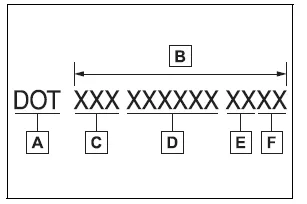
- DOT symbol*
- Tire Identification Number (TIN)
- Tire manufacturer's identification mark
- Manufacturer's code
- Manufacturing week
- Manufacturing year
*: The DOT symbol certifies that the tire conforms to applicable Federal Motor Vehicle Safety Standards.
Tire size
■ Typical tire size information
The illustration indicates typical tire size.
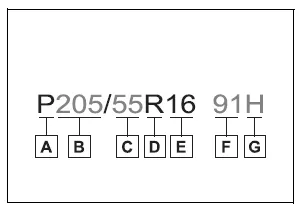
- Tire use (P = Passenger car, T = Temporary use)
- Section width (millimeters)
- Aspect ratio (tire height to section width)
- Tire construction code (R = Radial, D = Diagonal)
- Wheel diameter (inches)
- Load index (2 digits or 3 digits)
- Speed symbol (alphabet with one letter)
■ Tire dimensions
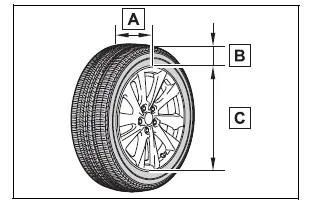
- Section width
- Tire height
- Wheel diameter
Tire section names
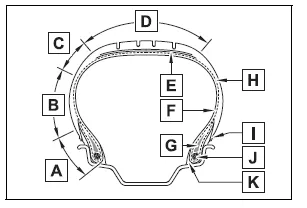
- Bead
- Sidewall
- Shoulder
- Tread
- Belt
- Inner liner
- Reinforcing rubber
- Carcass
- Rim lines
- Bead wires
- Chafer


Other materials:
Engine immobilizer system
The vehicle’s keys have built-in transponder chips that prevent the engine
from starting if a key has not been previously registered in the vehicle’s on-board
computer.
Never leave the keys inside the vehicle when you leave the vehicle.
Vehicles without a smart key system: The indicator li ...
Engine oil
With the engine at operating temperature and turned off, check the oil level
on the dipstick.
■ Checking the engine oil
1 Park the vehicle on level ground. After warming up the engine and turning it
off, wait more than 5 minutes for the oil to drain back into the bottom of the engine.
2 ...
Preparations to use wireless communication
The following can be performed using Bluetooth® wireless communication:
■ A portable audio player can be operated and listened to via multimedia system
■ Hands-free phone calls can be made via a cellular phone In order to use wireless
communication, register and connect a Bluetooth ...