
Toyota Corolla (E120) 2002–2008 Repair Manual / Brake / Skid control sensor
Toyota Corolla (E120): Skid control sensor
Replacement
Hint
: replace the rh side by the same procedure as the lh side.
1. Remove rear wheel
2. Remove rear brake drum sub–assy
3. Disconnect skid control sensor wire
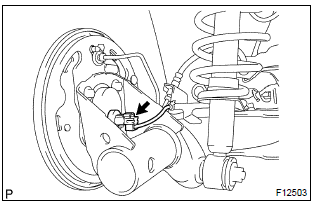
- Disconnect the skid control sensor wire connector from the skid control sensor.
4. Remove rear axle hub & bearing assy lh
5. Remove skid control sensor
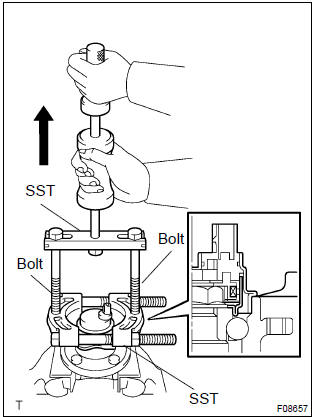
- Mount the rear axle hub in a soft jaw vise.
Notice
: replace the axle hub assembly if it is dropped or a strong shock is given to it.
- using a pin punch and hammer, drive out the 2 pins and remove the 2 attachments from sst.
- using sst and 2 bolts (diameter: 12 mm, pitch: 1.5 Mm),
remove the skid control sensor from the rear axle hub.
Sst 09520–00031 (09520–00040), 09521–00020, 09950–00020
N
otice
:
- if a damage is inflicted to the sensor rotor, replace the axle hub assembly.
- Do not scratch the contacting surface of axle hub and speed sensor.
6. Install skid control sensor
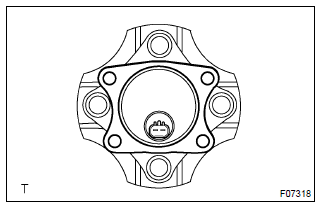
- clean the contacting surface of the axle hub and a new
speed sensor.
Notice
: do not stick any foreign objects to the sensor rotor.
- place the speed sensor on the axle hub so that the connector makes the lowest position under the on–vehicle condition.
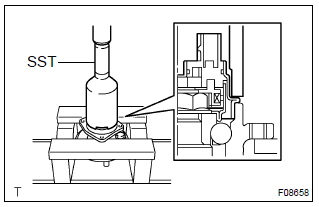
- Using sst and press, install the new speed sensor to the
axle hub.
Sst 09214–76011
7. Install rear axle hub & bearing assy lh
8. Connect skid control sensor wire
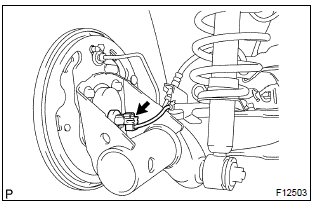
- Connect the skid control sensor wire connector to the skid control sensor.
9. Install rear brake drum sub–assy
10. Install rear wheel
torque: 103 nvm (1,050 Kgf·cm, 76 ft·lbf)
11. Inspect and adjust rear wheel alignment
12. Check abs speed sensor signal


Other materials:
Circuit description
The purpose of this circuit is to prevent the engine from stalling while
driving in lock–up condition, when
brakes are suddenly applied.
When the brake pedal is depressed, this switch sends a signals to the ecm. Then
the ecm cancels the operation
of the lock–up clutch while braking is i ...
About this vehicle
1. Structural outline
2. Notice about vehicle condition when jacking up
vehicle
(a) notice for using jack and safety stand
(B) notice for using swing arm type lift
(C) notice for using plate type lift
3. Damage diagnosis
4. Components
(a) front bumper
(B) side mu ...
Inspection procedure
1 Inspect cruise control actuator assy
Inspect the cruise control actuator arm locking operation.
Turn the ignition switch to off.
Disconnect the cruise control actuator assy connector.
Connect the positive (+) lead from the battery to the
terminal 3 (l) of crui ...