
Toyota Corolla (E120) 2002–2008 Repair Manual / Diagnostics / Toyota vehicle intrusion protection system / Indicator light circuit / Inspection procedure
Toyota Corolla (E120): Inspection procedure
1 Check security indicator light
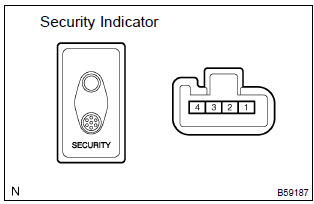
- Remove the security indicator.
- check the indicator light, as shown in the illustration and table.
Standard:



2 Check wire harness (tvip ecu security indicator)
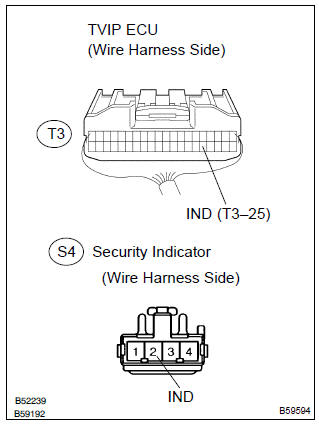
- Disconnect the tvip ecu and security indicator connectors.
- check the continuity between the terminals of the tvip ecu connector and security indicator connector, as shown in the illustration and table.
Standard:



3 Check wire harness (security indicator body ground)
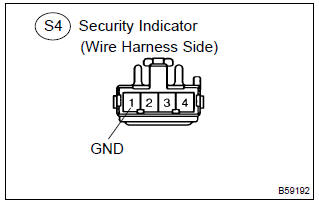
- Disconnect the security indicator connector.
- check the continuity between the terminal of the security indicator connector and body ground, as shown in the illustration and table.
Standard:



Check and replace tvip ecu


Other materials:
Using the AUX port
This port can be used to connect a portable audio device and listen to it through
the vehicle’s speakers. Press until
“AUX” is displayed.
Connecting a portable player
■Operating portable audio devices connected to the audio system
The volume can be adjusted using the vehicle's ...
Circuit description
The rear heated oxygen sensor is used to monitor oxygen concentration in the
exhaust gas. For optimum
catalytic converter operation, the air fuel mixture must be maintained near the
ideal ”stoichiometric” ratio.
The heated oxygen sensor output voltage changes suddenly in the vicinity of ...
Maintenance requirements
To ensure safe and economical
driving, day-to-day care
and regular maintenance
are essential. It is the
owner's responsibility to
perform regular checks.
Toyota recommends the
maintenance below.
■Repair and replacement
It is recommended that genuine
Toyota parts be used for repairs to
ensure perf ...