
Toyota Corolla (E170): Rear seats
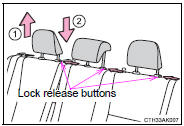
► Type A
1 Up
Pull the head restraints up.
2 Down
Push the head restraint down while pressing the lock release button.
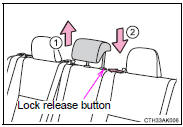
► Type B
1 Up
Pull the head restraints up.
2 Down
Push the head restraint down while pressing the lock release button.
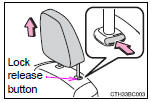
■Removing the head restraints (except for fixed rear head restraints)
Pull the head restraint up while pressing the lock release button.
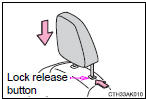
■Installing the head restraints (except for fixed rear head restraints) ►
Front seats and rear outside seats Align the head restraint with the installation holes and push it down to the lock position.
Press and hold the lock release button when lowering the head restraint.
►
Rear center seat
Align the head restraint with the installation holes and push it down to the lowest lock position while pressing the lock release button.
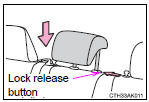
■Adjusting the height of the head restraints (except for fixed rear head restraints)
Make sure that the head restraints are adjusted so that the center of the head restraint is closest to the top of your ears.
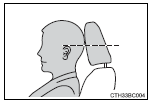
■Adjusting the rear center seat head restraint
Always raise the head restraint one level from the stowed position when using.
CAUTION
■Head restraint precautions
Observe the following precautions regarding the head restraints. Failure to do so may result in death or serious injury.
●Use the head restraints designed for each respective seat.
●Adjust the head restraints to the correct position at all times.
●After adjusting the head restraints, push down on them and make sure they are locked in position.
●Do not drive with the head restraints removed.


Other materials:
Using the audio system
Optimal use of the audio system
Sound quality (treble/bass) and volume balance can be adjusted.
1 Displays the current mode
2 Changes the following setting
• Sound quality and volume balance
The sound quality and balance setting can be changed to produce the best sound.
• Automatic ...
Selecting a folder
■ Selecting a folder
Press (
) or (
) to select the desired folder.
■ Selecting a folder and file from a folder list
1 Press .
A folder list will be displayed.
2 Turn and press to select a folder
and a file.
To return to the previous display, press
(BACK).
■ Return ...
Inspection procedure
1 Check operation(starter)
Check that the starter operates normally and that the engine starts.
2 Input signal check
See input signal check on page 05–745.
check the indicator light when shifting into except d position.
Ok:
the indicator light goes off when shifting ...