
Toyota Corolla (E120) 2002–2008 Repair Manual / Wiper & washer / Wiper and washer system / Problem symptoms table
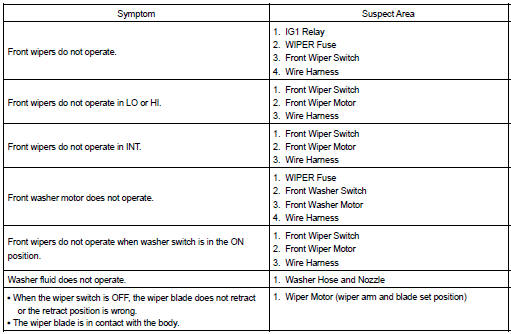
Toyota Corolla (E120): Problem symptoms table
1. Wiper and washer system


Other materials:
Diagnostic trouble code chart
Hint:
when the srs warning light remains lit up and the dtc is the normal
code, this means a voltage source
drops.
This malfunction is not stored in memory by the airbag sensor assy center
and if the power source
voltage returns to normal, the srs warning light will autom ...
Inspection procedure
1 Inspect transmission wire(sl)
Disconnect the transmission wire connector from the
transaxle.
measure the resistance according to the value(s) in the
table below.
Standard:
2 Check harness and connector(transmission wire – ecm)
Connect the transmission wire c ...
Monitor description
The battery supplies electricity to the ecm even when the ignition switch is
off. This electricity allows the
ecm store data such as dtc history, freeze frame data, fuel trim values, and
other data. If the battery voltage
falls below a minimum level, the ecm will conclude that there is a fault ...