
Toyota Corolla (E120): Pre–check
1. Selecting compass display mode
- the compass switch allows you to select the display or non–display mode of the compass.
2. Setting zone
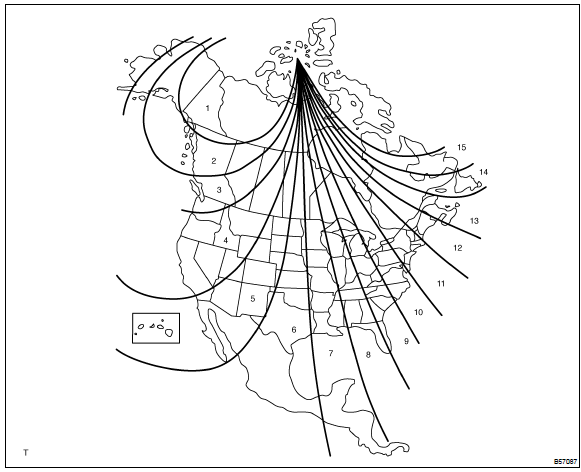
- deviation between the ”magnetic north” and ”actual north” differs depending on the location. Therefore, adjustment of the magnetism is required. Since the magnetic condition differs according to the area where the vehicle is used, it is necessary for each user to set the zone (refer to ”compass zone map”). The zone setting can be changed using the comp switch of the inner mirror.
3. Performing calibration
- because each vehicle has its own magnetic field, calibration
should be performed for each vehicle.
This compass function is used when storing the record of the vehicle’s magnetic field.
4. When compass magnetized:
- a compass could be magnetized during shipping by vessels or freight cars. Before delivery, therefore, make sure to perform calibration and ensure that calibration is done properly. If it cannot be done (cannot be complete in spite of driving around several times), it may be caused by magnetization. Demagnetize the vehicle using a demagnetizer and perform calibration again.
5. Setting compass
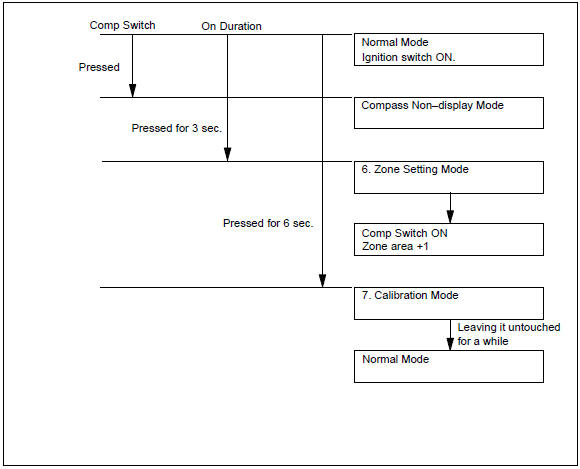
6. Zone setting mode
- pressing the comp switch for 3 seconds, in the normal mode, will
activate the zone setting mode.
A number (1 – 15) is displayed on the compass display.
Hint
: in the initial state, ”8” is displayed.
- the displayed number increases +1 every time the comp switch is pressed. Referring to the map, check the number for the area where the vehicle will be used and set the zone number.
- leave it untouched for several seconds after setting and check that the compass display shows an azimuthal direction (n, ne, e, se, s, sw, w or nw) or ”c”.
7. Calibration setting mode
- pressing the comp switch for 6 seconds, in the normal mode, will also activate this mode.
- drive the vehicle at a slow speed of 8 km/h (5 mph) or less in the circular direction.
- driving around the circle 1 to 3 times will display the azimuthal direction on the display, completing the calibration.
Hint
: once calibration is complete, it is not necessary to perform the above procedures unless the magnetic field strength is drastically changed. If this happens, the azimuthal display will be changed to ”c”.


Other materials:
Switching the display
Press to display or hide the album
title.
If there is additional text, is
displayed.
Press and hold to display the remaining
text.
■USB memory functions
●Depending on the USB memory that is connected to the system, the device itself
may not be operable and certain function ...
Replacement
1. Remove clutch start switch assy
disconnect the clutch start switch assy connector.
remove the nut and clutch start switch assy from the clutch pedal
support.
2. Install clutch start switch assy
install the clutch start switch assy with the nut.
Torque: 15.68 Nv ...
Replacing light bulbs
■ Headlight high beams
1 Turn the bulb base counterclockwise.
2 Pull the bulb out while pressing the lock release of the connector.
3 Replace the light bulb, and install the bulb base.
Align the 3 tabs on the light bulb with the mounting and insert.
4 Turn and secure the bulb base.
...