
Toyota Corolla (E120) 2002–2008 Repair Manual / Audio & visual / Power point socket assy rr
Toyota Corolla (E120): Power point socket assy rr
Replacement
Hint
: components:
1. Remove parking brake hole cover sub–assy
2. Remove floor shift shift lever knob sub–assy (m/t transaxle)
3. Remove console panel upper
4. Remove console box carpet
5. Remove console box sub–assy rear (m/t transaxle)
6. Remove console box sub–assy rear (a/t transaxle)
7. Remove power point socket assy rr
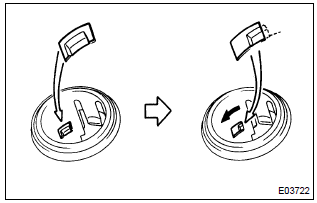
- Turn the socket in the circumference direction as shown the illustration, disengage the claw between the socket and the power outlet socket cover rr, and push out the socket to the room side.
- align the socket with the notch on the power outlet socket cover rr, remove the power point socket assy rr to the room side.
8. Install power point socket assy rr
- align the socket with the notch on the power outlet socket cover rr, push the power point socket assy rr into as hard as possible and install it.


Other materials:
Inspection
1. Inspect front seat inner belt assy lh
When fastening the seat belt (buckle switch on).
Inspect the continuity and resistance between the
terminals.
Standard:
If the result is not as specified, replace the inner belt.
When releasing the seat belt (buckle switch ...
Front no.2 Speaker assy
Replacement
Hint: components:
1. Remove front armrest assy lh
2. Remove power window regulator master switch assy (w/ power window)
3. Remove front armrest base panel upper lh (w/o power window)
4. Remove front door window regulator handle assy (w/o power window)
5. Remove front door lower ...
How to proceed with troubleshooting
The hand–held tester can be used at step 4, 6, 8 and 9.
1 Vehicle brought to workshop
2 Customer problem analysis
3 Warning light check
4 The dtcs check (present and past dtcs)
5 The dtcs chart
6 Circuit inspection
7 Repair
8 Clear the dtcs (present and past dtcs)
9 The dt ...