
Toyota Corolla (E120) 2002–2008 Repair Manual / Drive shaft / propeller shaft / Drive shaft, propeller shaft, axle / On–vehicle inspection
Toyota Corolla (E120): On–vehicle inspection
1. Inspect front axle hub bearing
- remove the front wheel.
- separate the front disc brake caliper assy .
- remove the front disc.
- inspect the bearing backlash.
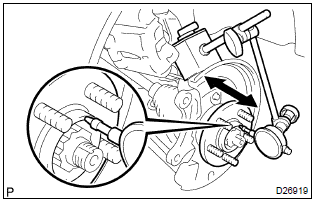
- Using a dial indicator, check the backlash near the
center of the axle hub.
Maximum: 0.05 Mm (0.0020 In.)
If the backlash exceeds the maximum, replace the front axle hub bearing.
- inspect the axle hub deviation.
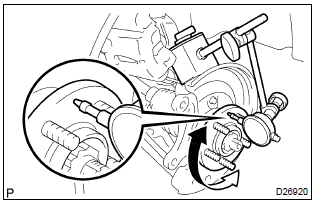
- Using a dial indicator, check the deviation at the surface
of the axle hub outside the hub bolt.
Maximum: 0.05 Mm (0.0020 In.)
If the backlash exceeds the maximum, replace the front axle hub sub–assy.
- install the front disc.
- install the front disc brake caliper assy .
- install the front wheel.
Torque: 103 nvm (1,050 Kgf·cm, 76 ft·lbf)
2. Inspect rear axle hub bearing
- remove the rear wheel.
- remove rear brake drum sub–assy.
- inspect the bearing backlash.
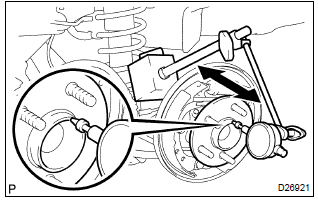
- Set a dial indicator near the center of the axle hub
and check the backlash in the bearing shaft sirection.
Maximum: 0.05 Mm (0.0020 In.)
If the backlash exceeds the maximum, replace the rear axle hub & bearing assy.
- Inspect the axle hub deviation.
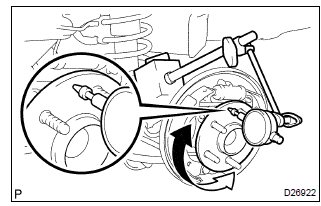
- Using a dial indicator, check the deviation at the surface
of the axle hub outside the hub bolt.
Maximum: 0.07 Mm (0.0028 In.)
If the backlash exceeds the maximum, replace the rear axle hub & bearing assy.
- install the rear brake drum sub–assy.
- install the rear wheel.
Torque: 103 nvm (1,050 Kgf·cm, 76 ft·lbf)


Other materials:
Maintenance requirements
To ensure safe and economical driving, day-to-day care and regular maintenance
are essential. It is the owner’s responsibility to perform regular checks. Toyota
recommends the following maintenance:
General maintenance
General maintenance should be performed on a daily basis. This can be don ...
Inspection procedure
1 Check side squib(lh) circuit(airbag sensor assy center – front
seat airbag assy lh)
Disconnect the negative (–) terminal cable from the battery,
and wait at least for 90 seconds.
disconnect the connectors between the airbag sensor
assy center and the front seat airbag assy ...
Using the audio system
Optimal use of the audio system
Sound quality (treble/bass) and volume balance can be adjusted.
1 Displays the current mode
2 Changes the following setting
• Sound quality and volume balance
The sound quality and balance setting can be changed to produce the best sound.
• Automatic ...