
Toyota Corolla (E120): Inspection procedure
1 Check door lock
- When the door does not operate manually, proceed to ”a”.
- when the door does not operate via the key, proceed to ”b”.


2 Inspect door lock control switch
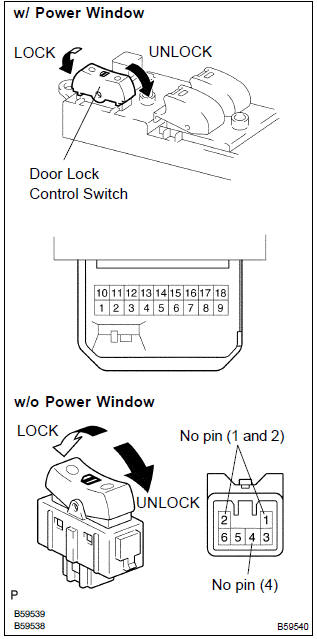
- W/ power window: remove the power window regulator master switch assy.
- Inspect the master switch (door lock control switch) continuity, as shown in the illustration and table.
Standard:

- W/o power window: remove the door lock control switch.
- Inspect the door lock control switch continuity, as shown in the illustration and table.
Standard:

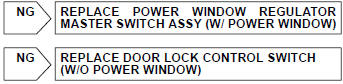

3 Check wire harness (switch integration relay)
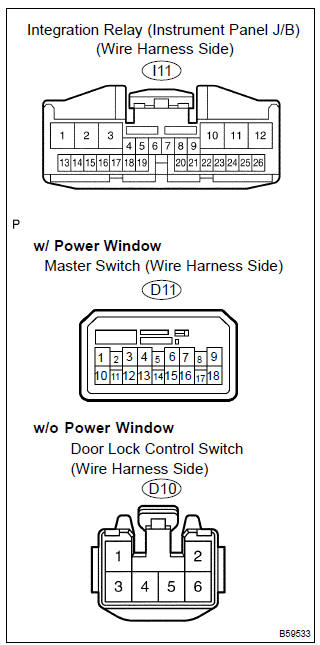
- W/ power window:
disconnect the power window regulator master switch
assy and integration relay connectors.
W/o power window: disconnect the door lock control switch and integration relay connectors.
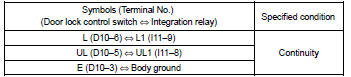
- check the continuity between the terminals of the power window regulator master switch assy or door lock control switch and integration relay connectors, as shown in the illustration and tables.
[W/ power window] standard (check for open):
![[W/o power window]](images/books/422/24/index.38.jpg)
[W/o power window] standard (check for open):
4 Inspect driver’s door lock
- Inspect the driver’s door lock key switch.
- inspect the driver’s door lock position switch.


5 Check wire harness (driver’s door lock integration relay)
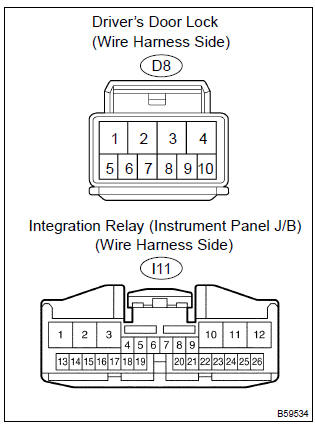
- Disconnect the driver’s door lock and integration relay connectors.
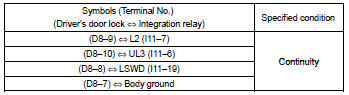
- check the continuity between the terminals of the driver’s door lock and integration relay connectors, as shown in the illustration and table.
Standard (check for open):


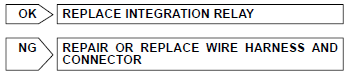
Replace integration relay


Other materials:
Manual transaxle oil
On–vehicle inspection
1. Inspect transaxle oil
Stop the vehicle on the level place.
remove the transmission filler plug and gasket.
check that the oil surface is within 5 mm (0.20 In.) From the
lowest position of the inner surface of the transmission filler
plug openin ...
Circuit description
Hint:
these dtcs indicate a malfunction related to the primary circuit.
If dtc p0351 is displayed, check the no.1 Ignition coil with igniter
circuit.
If dtc p0352 is displayed, check the no.2 Ignition coil with igniter
circuit.
If dtc p0353 is displayed, check the no.3 Ignition coil ...
Using the radio
Radio operation
Select “AM” or “FM” to begin listening to the radio.
1 Power
2 Volume
3 Station selectors
4 Adjust frequency or select an item
5 AM/FM mode button
6 Scan for receivable stations
7 Seek a frequency
Setting station presets
1Search for a desired station by turning
...