
Toyota Corolla (E120) 2002–2008 Repair Manual / Diagnostics / Supplemental restraint system / Open in side squib (rh) circuit / Inspection procedure
Toyota Corolla (E120): Inspection procedure
1 Check side squib(rh) circuit(airbag sensor assy center – front seat airbag assy rh)
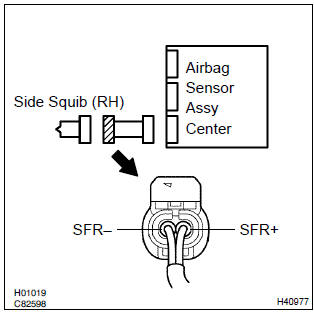
- Disconnect the negative (–) terminal cable from the battery, and wait at least for 90 seconds.
- disconnect the connectors between the airbag sensor assy center and the front seat airbag assy (rh).
- for the connector (on the front seat airbag assy side) between
the airbag sensor assy center and the front seat
airbag assy (rh), measure the resistance between sfr+
and sfr–.
Ok: resistance: below 1 w


2 Check air bag sensor assy center
Sst 09843–18040
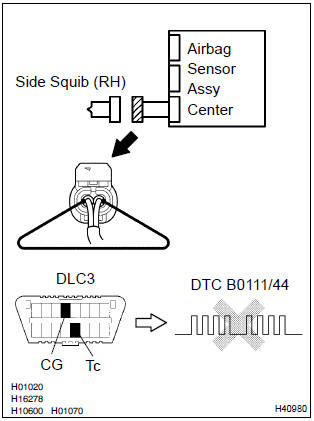
- Connect the connector to the airbag sensor assy center.
- using a service wire, connect sfr+ and sfr– of the connector (on the front seat airbag assy side) between the airbag sensor assy center and the front seat airbag assy (rh).
- connect the negative (–) terminal cable to the battery, and wait at least for 2 seconds.
- turn the ignition switch to on, and wait at least for 20 seconds.
- clear the dtc stored in memory .
- turn the ignition switch to lock, and wait at least for 20 seconds.
- turn the ignition switch to on, and wait at least for 20 seconds.
- check the dtc .
Ok: dtc b0111/44 is not output.
Hint
: codes other than code b0111/44 may be output at this time, but they are not relevant to this check.


3 Check side squib(rh)
Sst 09843–18040
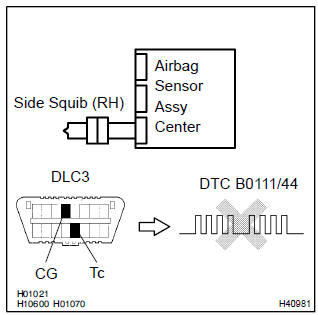
- Turn the ignition switch to lock.
- disconnect the negative (–) terminal cable from the battery, and wait at least for 90 seconds.
- connect the front seat airbag assy (rh) connector.
- connect the negative (–) terminal cable to the battery, and wait at least for 2 seconds.
- turn the ignition switch to on, and wait at least for 20 seconds.
- clear the dtc stored in memory .
- turn the ignition switch to lock, and wait at least for 20 seconds.
- turn the ignition switch to on, and wait at least for 20 seconds.
- check the dtc .
Ok: dtc b0111/44 is not output.
Hint
: codes other than code b0111/44 may be output at this time, but they are not relevant to this check.


Use simulation method to check


Other materials:
Initialization
Select “Initialize” using .
● Initializing the sound settings
Select “Sound setting” using and press
(YES).
For details about sound settings: ● Initializing the device information
Select “Car Device Info” using and
press (YES).
Automatic connection of a portable ...
Inspection procedure
1 Input signal check
See input signal check on page 05–745.
check the indicator light operation when each of the set/
coast, resume/accel and cancel is turned on.
Ok:
set/coast, resume/accel switch:
the signals shown in the table on the left should be
output when each switch is ...
Circuit description
The side airbag sensor assy (rh) circuit consists of the diagnosis circuit
and lateral deceleration sensor, etc.
It receives signals from the lateral deceleration sensor, judges whether or not
the srs must be activated,
and detects diagnosis system malfunction.
Dtc b1140/32 is recorded wh ...