
Toyota Corolla (E170) 2014–2019 Owners Manual / When trouble arises / Steps to take in an emergency / If the vehicle becomes stuck
Toyota Corolla (E170): If the vehicle becomes stuck
Carry out the following procedures if the tires spin or the vehicle becomes stuck in mud, dirt or snow:
1 Stop the engine. Set the parking brake and shift the shift lever to P (automatic transmission or continuously variable transmission) or N (manual transmission).
2 Remove the mud, snow or sand from around the front wheels.
3 Place wood, stones or some other material under the front wheels to help provide traction.
4 Restart the engine.
5 Shift the shift lever to D or R (automatic transmission or continuously variable transmission) or 1 or R (manual transmission) and release the parking brake. Then, while exercising caution, depress the accelerator pedal.
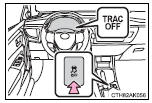
■When it is difficult to free the vehicle (vehicles with a TRAC system)
Press  to turn off TRAC.
CAUTION
■When attempting to free a stuck vehicle
If you choose to push the vehicle back and forth to free it, make sure the surrounding area is clear to avoid striking other vehicles, objects or people.
The vehicle may also lunge forward or lunge back suddenly as it becomes free. Use extreme caution.
■When shifting the shift lever
Be careful not to shift the shift lever with the accelerator pedal depressed.
This may lead to unexpected rapid acceleration of the vehicle that may cause an accident resulting in death or serious injury.
NOTICE
■To avoid damaging the transmission and other components
●Avoid spinning the front wheels and depressing the accelerator pedal more than necessary.
●If the vehicle remains stuck even after these procedures are performed, the vehicle may require towing to be freed.


Other materials:
Diagnostic trouble code chart
The inspection procedures are shown in the table below. This table allows
efficient and accurate troubleshooting
using the diagnostic trouble codes displayed in the diagnostic trouble code
chart. Proceed with
troubleshooting in accordance with the inspection procedures listed in the
diagnost ...
Body
On–vehicle inspection
1. Canada:
tighten bolts and nuts on chassis and body
tighten the bolts and nuts on the chassis parts listed below, if
necessary
Front axle and suspension
drive train
rear axle and suspension
brake system
engine mounting
other chassis parts
...
Initialization
1. Reset memory
Caution:
perform the reset memory (at initialization) when replacing the automatic
transaxle assy, engine
assy or ecm.
Notice:
hand–held tester only
Turn the ignition switch off.
connect the hand–held tester to the dlc3.
turn the ignition switch to th ...