
Toyota Corolla (E210) 2019-2026 Owners Manual / For safety and security / Theft deterrent system / Engine immobilizer system
Toyota Corolla (E210): Engine immobilizer system
The vehicle's keys have built-in transponder chips that prevent the engine from starting if a key has not been previously registered in the vehicle's on-board computer.
Never leave the keys inside the vehicle when you leave the vehicle.
This system is designed to help prevent vehicle theft but does not guarantee absolute security against all vehicle thefts.
Operating the system
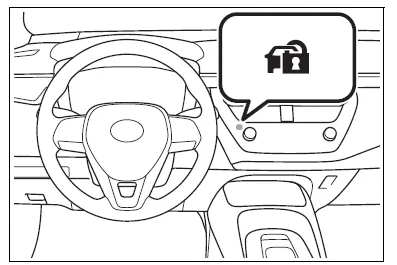
Vehicles without a smart key system
The indicator light flashes after the key has been removed from the engine switch to indicate that the system is operating.
The indicator light stops flashing after the registered key has been inserted into the engine switch to indicate that the system has been canceled.
Vehicles with a smart key system
The indicator light flashes after the engine switch has been turned off to indicate that the system is operating.
The indicator light stops flashing after the engine switch has been turned to ACC or ON to indicate that the system has been canceled.
■System maintenance
The vehicle has a maintenance- free type engine immobilizer system.
■Conditions that may cause the system to malfunction
- If the grip portion of the key is in contact with a metallic object
- If the key is in close proximity to or touching a key to the security system (key with a built-in transponder chip) of another vehicle
NOTICE
■To ensure the system operates correctly
Do not modify or remove the system.
If modified or removed, the proper operation of the system cannot be guaranteed.


Other materials:
Inspection procedure
1 Inspect dlc3 terminal voltage
Turn the ignition switch to on.
measure voltage between terminals 13 (tc) and 4 (cg) of
dlc3.
Ok:
voltage: 10 – 16 v
2 Check harness and connector(between cruise control ecu assy
and dlc3)
Check for open and short circuit in harness ...
Shift solenoid ”a” performance
(shift solenoid valve s1)
Dtc p0751 shift solenoid ”a” performance
(shift solenoid valve s1)
System description
The ecm uses signals from the vehicle speed sensor and crankshaft position
sensor to detect the actual
gear position (1st, 2nd, 3rd or o/d gear).
Then the ecm compares the actual gear with the shift sc ...
Meter display
■ Locations of gauges and meters
The units of measure may differ depending on the intended destination of
the vehicle.
Tachometer
Displays the engine speed in revolutions per minute
Outside temperature
Displays the outside temperature within the range of -40ºF (-40ºC) to 140ºF
(60ºC)
...