
Toyota Corolla (E120) 2002–2008 Repair Manual / Diagnostics / Toyota vehicle intrusion protection system / How to proceed with troubleshooting
Toyota Corolla (E120): How to proceed with troubleshooting
Troubleshoot in accordance with the procedure on the following pages.
1 Vehicle brought to workshop

2 Customer problem analysis check and symptom check
- Without applicable symptoms, proceed to ”a”.
- with applicable symptoms, proceed to ”b”.


3 Symptom simulation

4 Problem symptoms table
- Without applicable symptoms, proceed to ”a”.
- with applicable symptoms, proceed to ”b”.


5 Circuit inspection and part inspection

6 Perform troubleshooting in the following method, depending on malfunction symptom
- Terminals of ecu (seepage 05–703)
- on–vehicle inspection
7 Adjustment, repair or replacement

8 Confirmation test

End
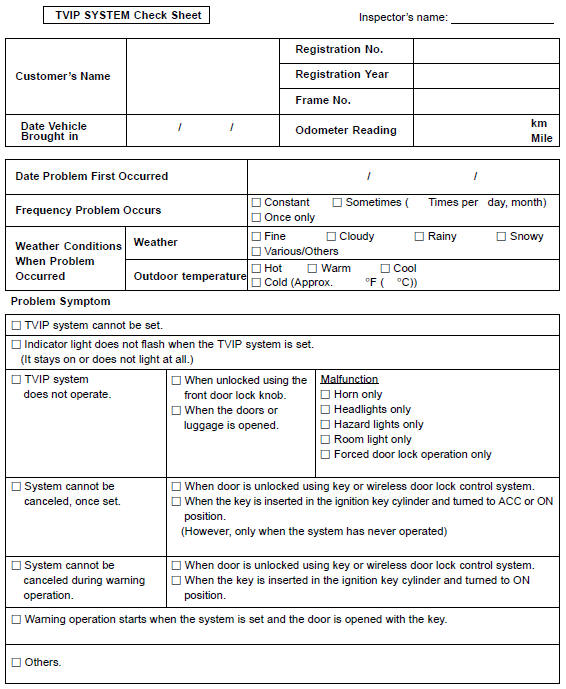
Customer problem analysis check
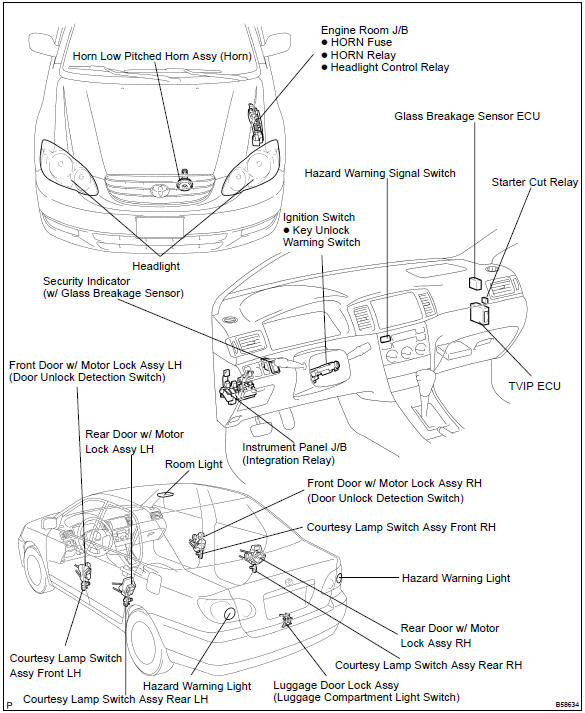
Location


Other materials:
How to proceed with troubleshooting
1 Vehicle brought to workshop
2 Customer problem analysis
3 Problem symptom confirmation
4 Circuit inspection
5 Repair or replace
6 Confirmation test
7 End
Customer problem analysis check
...
Overhaul
1. Precaution
2. Disconnect battery negative terminal
3. Inspect place front wheels facing straight ahead
4. Remove horn button assy
Notice:
if the airbag connector is disconnected with the ignition
switch being at on, dtcs will be recorded.
using a torx socket wrench, loosen the ...
Circuit description
The vapor pressure sensor, vsv for canister closed valve (ccv), vsv for
pressure switching valve are used
to detect abnormalities in the evaporative emission control system.
The ecm decides whether there is an abnormality in the evaporative emission
control system based on the
vapor pressur ...