
Toyota Corolla (E210): Front seats
Adjustment procedure
Manual seat
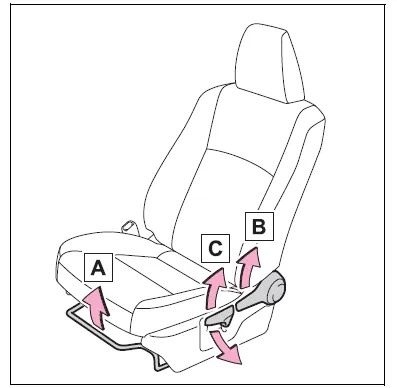
- Seat position adjustment lever
- Seatback angle adjustment lever
- Vertical height adjustment lever (driver's side only)
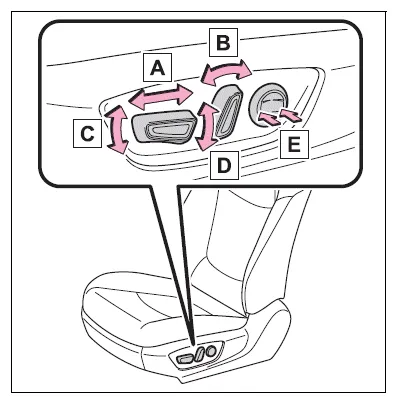
Power seat (driver's side only)
WARNING
■When adjusting the seat position
- Take care when adjusting the seat position to ensure that other passengers are not injured by the moving seat.
- Do not put your hands under the
seat or near the moving parts to
avoid injury.
Fingers or hands may become jammed in the seat mechanism.
- Make sure to leave enough space around the feet so they do not get stuck.
■Seat adjustment
- Be careful that the seat does not hit passengers or luggage.
- To reduce the risk of sliding
under the lap belt during a collision,
do not recline the seat
more than necessary.
If the seat is too reclined, the lap belt may slide past the hips and apply restraint forces directly to the abdomen, or your neck may contact the shoulder belt, increasing the risk of death or serious injury in the event of an accident.
Adjustments should not be made while driving as the seat may unexpectedly move and cause the driver to lose control of the vehicle.
- Manual seat only: After adjusting the seat, make sure that the seat is locked in position.
NOTICE
■When adjusting a front seat
When adjusting a front seat, make sure that the head restraint does not contact the headliner. Otherwise, the head restraint and headliner may be damaged.


Other materials:
Brake
Service data
Torque specification
Parking brake
Service data
Torque specification
...
Inspection procedure
1 Check p squib circuit(airbag sensor assy center – instrument
panel passenger airbag assy)
Disconnect the negative (–) terminal cable from the battery,
and wait at least for 90 seconds.
disconnect the connector between the airbag sensor
assy center and the instrument panel ...
Foamed material application areas
If an increase in temperature or other condition damages the foamed material
when repairing or replacing the panel,
fill in the insufficient areas with urethane foam. The following illustration
shows the areas for one side, but the
foamed material must be applied equally to both the left and r ...