
Toyota Corolla (E170) 2014–2019 Owners Manual / Operation of each component / Adjusting the seats / Outside rear view mirrors / Folding the mirrors
Toyota Corolla (E170): Folding the mirrors
Push the mirror back in the direction of the vehicle’s rear.
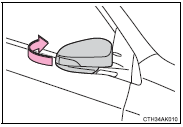
■Mirror angle can be adjusted when
► Vehicles without a smart key system The engine switch is in the “ACC” or “ON” position.
►Vehicles with a smart key system The engine switch is in ACCESSORY or IGNITION ON mode.
■When the mirrors are fogged up (if equipped)
The outside rear view mirrors can be cleared using the mirror defoggers. Turn on the rear window defogger to turn on the outside rear view mirror defoggers.
CAUTION
■Important points while driving
Observe the following precautions while driving.
Failure to do so may result in loss of control of the vehicle and cause an accident, resulting in death or serious injury.
●Do not adjust the mirrors while driving.
●Do not drive with the mirrors folded.
●Both the driver and passenger side mirrors must be extended and properly adjusted before driving.
■When a mirror is moving
To avoid personal injury and mirror malfunction, be careful not to get your hand caught by the moving mirror.
■When the mirror defoggers are operating (if equipped
) Do not touch the rear view mirror surfaces, as they can become very hot and burn you.


Other materials:
Circuit description
The actuator motor is operated by signals from the cruise control ecu assy.
Acceleration and deceleration
signals are transmitted by changes in the duty ratio (see below).
Duty ratio:
the duty ratio is the ratio of the period of continuity in one cycle. For
example, if a is the period of co ...
Engine mechanical
Service data
Torque specification
...
Heated steering wheel/seat heaters
Heated steering wheel
Warms up the grip of the
steering wheel
Seat heaters
Warm up the seat upholstery
WARNING
To prevent minor burn injuries
Care should be taken if anyone in
the following categories comes in
contact with the steering wheel or
seats when the heater is on:
Babies, small chil ...