
Toyota Corolla (E170) 2014–2019 Owners Manual / Interior features / Other interior features / Compass / Displays and directions
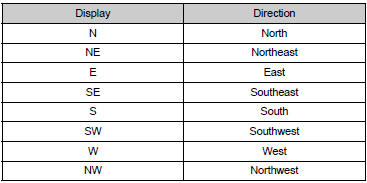
Toyota Corolla (E170): Displays and directions


Other materials:
Parking brake
The parking brake can be
set or released automatically
or manually.
In automatic mode, the
parking brake can be set or
released automatically
according to shift lever
operation.
Also, even in automatic
mode, the parking brake can
be set or released manually.
Operating instructions
■ Using the ma ...
Bluetooth®
■When using the Bluetooth® audio system
●In the following situations, the system may not function.
• The portable player does not support Bluetooth®
• The cellular phone is located outside the service area
• The Bluetooth® device is switched off
• The Bluetooth® device h ...
Maintenance requirements
To ensure safe and economical
driving, day-to-day care
and regular maintenance
are essential. It is the
owner's responsibility to
perform regular checks.
Toyota recommends the
maintenance below.
■Repair and replacement
It is recommended that genuine
Toyota parts be used for repairs to
ensure perf ...