
Toyota Corolla (E120) 2002–2008 Repair Manual / Diagnostics / Sfi system / Camshaft position ”a” –timing over / Circuit description
Toyota Corolla (E120): Circuit description
Refer to dtc p0010
|
Dtc no. |
Dtc detection condition |
Trouble area |
| P0011 | Condition (a) or (b) continues after engine is warmed up and
engine speed at 550 to 4,000 rpm (problem of the advanced
ocv):
|
|
| P0012 | Condition (a) or (b) continues after engine is warmed up and
engine speed at 550 to 4,000 rpm (problem of the retarded
ocv):
|
Monitor description
The ecm optimizes the valve timing using the variable valve timing (vvt) system to control the intake valve camshaft. The vvt system includes the ecm, the oil control valve (ocv) and the vvt controller. The ecm sends a target ”duty–cycle” control signal to the ocv. This control signal, applied to the ocv, regulates the oil pressure supplied to the vvt controller. The vvt controller can advance or retard the intake valve camshaft.
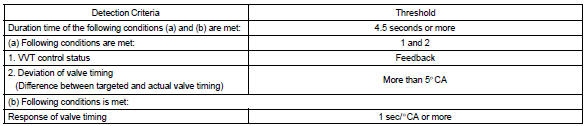
Example: when a difference between the targeted and actual valve timing is more than 5 camshaft angle ”ca” and this condition continues for more than 4.5 Sec, and if the ocv is forcibly activated 63 times or more.
Advanced cam dtcs are subject to ”1 trip” detection logic.
Retarded cam dtcs are subject to ”2 trip” detection logic.
Monitor strategy
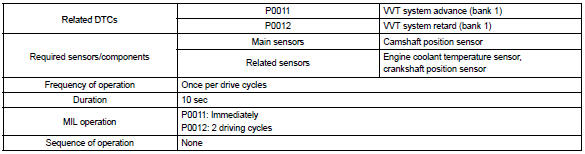
Typical enabling conditions

Typical malfunction thresholds
Wiring diagram
Refer to dtc p0010


Other materials:
Displaying the device status
Select “Bluetooth* info” using .
● Displaying the device name
Select “Device Name” using .
● Displaying the device address
Select “Device Address” using .
*: Bluetooth is a registered trademark of Bluetooth SIG, Inc. ...
Basic repair hint
(A) hints on operations
1
Looks
Always wear a clean uniform.
Hat and safety shoes must be worn.
2
Vehicle protection
Set a grill cover, fender cover, seat cover and floor mat before
starting the operation.
3
Safe ...
Overhaul
Caution:
wear the gloves, because the cutting surface of the seat back frame and seat
adjuster may injure
your hand.
Hint:
tape the screwdriver tip before use when prying parts.
1. Disconnect battery negative terminal
Caution:
wait for 90 seconds after disconnecting the battery terminal a ...