
Toyota Corolla (E170) 2014–2019 Owners Manual / Interior features / Using an external device (Multimedia system) / Listening to an iPod
Toyota Corolla (E170): Listening to an iPod
Connecting an iPod enables you to enjoy music from the vehicle speakers.
Select “iPod” on the audio source selection screen.
When the iPod connected to the system includes iPod video, the system can only output the sound by selecting the browse screen.
Connecting an iPod
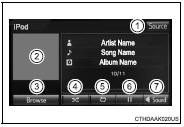
Audio control screen
Pressing the “AUDIO” button displays the audio control screen from any screens of the selected source.
1 Audio source selection screen appears
2 Displays cover art
3 Selecting the play mode
4 Shuffle play
5 Repeat play
6 Pause Select  to resume playback
7 Setting the sound
to resume playback
7 Setting the sound
Selecting a play mode
1 Select “Browse” on the screen.
2 Select the desired play mode by selecting the “Playlists”, “Artists”, “Albums”, “Songs”, “Podcasts”, “Audio books”, “Genres”, “Composers” or “Videos” tab. Then select a song to begin using the selected play mode.
Shuffle play
Select  to change on/off.
Repeat play
Select  to change on/off.
■About iPod

●“Made for iPod” and “Made for iPhone” mean that an electronic accessory has been designed to connect specifically to iPod or iPhone, respectively, and has been certified by the developer to meet Apple performance standards.
●Apple is not responsible for the operation of this device or its compliance with safety and regulatory standards. Please note that the use of this accessory with iPod or iPhone may affect wireless performance.
●iPhone, iPod, iPod classic, iPod nano, and iPod touch are trademarks of Apple Inc., registered in the U.S. and other countries. Lightning is a trademark of Apple Inc.
■iPod cover art
●Depending on the iPod and songs in the iPod, iPod cover art may be displayed.
●This function can be changed to on/off. ●It may take time to display iPod cover art, and the iPod may not be operated while the cover art display is in process.
●Only iPod cover art that is saved in JPEG format can be displayed.
■iPod functions
●When an iPod is connected and the audio source is changed to iPod mode, the iPod will resume play from the same point in which it was last used.
●Depending on the iPod that is connected to the system, certain functions may not be available. If a function is unavailable due to a malfunction (as opposed to a system specification), disconnecting the device and reconnecting it may resolve the problem.
●While connected to the system, the iPod cannot be operated with its own controls. It is necessary to use the controls of the vehicle's multimedia system instead.
●When the battery level of an iPod is very low, the iPod may not operate. If so, charge the iPod before use.
●Compatible models
■iPod problem
s To resolve most problems encountered when using your iPod, disconnect your iPod from the vehicle iPod connection and reset it. For instructions on how to reset your iPod, refer to your iPod Owner's Manual.
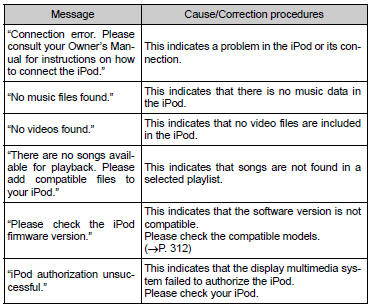
■Error messages
■Compatible models
The following iPod®, iPod nano®, iPod classic®, iPod touch® and iPhone® devices can be used with this system.
●Made for
• iPod touch (5th generation)
• iPod touch (4th generation)
• iPod touch (3rd generation)
• iPod touch (2nd generation)
• iPod touch (1st generation)
• iPod classic
• iPod with video
• iPod nano (7th generation)
• iPod nano (6th generation)
• iPod nano (5th generation)
• iPod nano (4th generation)
• iPod nano (3rd generation)
• iPod nano (2nd generation)
• iPod nano (1st generation)
• iPhone 5
• iPhone 4S
• iPhone 4
• iPhone 3GS
• iPhone 3G
• iPhone
Depending on differences between models or software versions etc., some models might be incompatible with this system.
CAUTION
■While driving
Do not connect an iPod or operate the controls.
NOTICE
■To prevent damage to the iPod or its terminals
●Do not leave the iPod in the vehicle. The temperature inside the vehicle may become high, resulting in damage to the iPod.
●Do not push down on or apply unnecessary pressure to the iPod while it is connected.
●Do not insert foreign objects into the port.


Other materials:
Combination meter assy
Overhaul
Hint: components:
1. Remove meter hood sub–assy
2. Remove combination meter assy
Remove the screw.
disengage the 2 clips as shown in the illustration.
disconnect the connector, then remove the combination
meter.
3. Remove combination meter glass
Di ...
Connecting a Bluetooth® audio player
► Registering an additional device
Select “Select Device” on the Bluetooth® audio control screen.
►Selecting a registered device
Select “Select Device” on the Bluetooth® audio control screen.
■Reconnecting a Bluetooth® phone
If the system cannot connect due to poor ...
Calculation formula for your vehicle
1 Cargo capacity
2 Total load capacity (vehicle capacity weight)
When 2 people with the combined weight of A lb. (kg) are riding in your vehicle,
which has a total load capacity (vehicle capacity weight) of B lb. (kg), the available
amount of cargo and luggage load capacity will be C lb. (kg ...