
Toyota Corolla (E170): Brake fluid
■ Checking fluid level
The brake fluid level should be between the “MAX” and “MIN” lines on the tank.
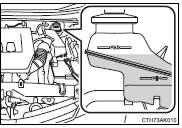
■ Adding fluid
Make sure to check the fluid type and prepare the necessary item.

1 Slide and lift up the rubber strip to partially remove it as shown.
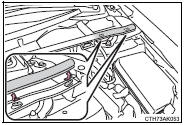
2 Disconnect the claws and remove the service cover.
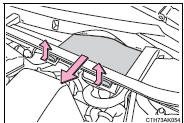
3 Remove the reservoir cap.
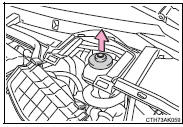
4 Add brake fluid slowly while checking the fluid level.
■Brake fluid can absorb moisture from the air
Excess moisture in the brake fluid can cause a dangerous loss of braking efficiency.
Use only newly opened brake fluid.
CAUTION
■When filling the reservoir
Take care as brake fluid can harm your hands and eyes and damage painted surfaces.
If fluid gets on your hands or in your eyes, flush the affected area with clean water immediately.
If you still experience discomfort, see a doctor.
NOTICE
■If the fluid level is low or high
It is normal for the brake fluid level to go down slightly as the brake pads wear out or when the fluid level in the accumulator is high.
However, if the reservoir needs frequent refilling, there may be a serious problem. Have the vehicle inspected at your Toyota dealer as soon as possible.


Other materials:
Parking brake
The parking brake can be
set or released automatically
or manually.
In automatic mode, the
parking brake can be set or
released automatically
according to shift lever
operation.
Also, even in automatic
mode, the parking brake can
be set or released manually.
Operating instructions
■ Using the ma ...
Moon roof
Use the overhead switches to open and close the moon roof and tilt it up and
down.
■ Opening and closing
1 Opens the moon roof* The moon roof stops slightly before the fully open position
to reduce wind noise.
Press the switch again to fully open the moon roof.
2 Closes the moon roof*
...
Introductions
4. Anti-rust treatment after installation
(A) body sealer application
Purpose:
for water-proofing and anti-rust measures, always
apply the body sealer to the body panel seams and
hems of the doors, hood, etc.
Notice:
apply body sealer neatly to parts that require a
high quality appeara ...