
Toyota Corolla (E210) 2019-2026 Owners Manual / Vehicle status information and indicators / Gauges and meters (7-inch display) / Odometer and trip meter
display
Toyota Corolla (E210): Odometer and trip meter display
■ Changing the display
Press the display change button until the desired item is displayed.
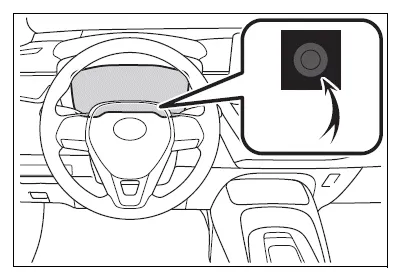
■ Display items
- Odometer
Displays the total distance the vehicle has been driven. - Trip meter A/Trip meter B
Displays the distance the vehicle
has been driven since the meter
was last reset. Trip meters A and B can be used to record and display
different distances independently.
To reset, display the desired trip meter and press and hold the display change button.
Changing the instrument panel light brightness
The brightness of the instrument panel lights can be adjusted.
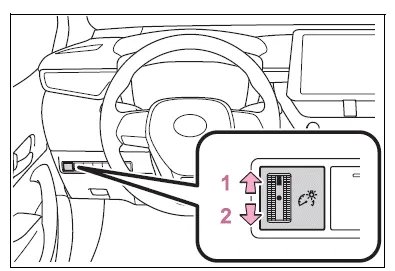
- Brighter
- Darker
■Instrument panel light brightness adjustment
The brightness of the instrument panel lights can be adjusted separately for when the tail lights are on and off.
Adjusting the clock
■ The clocks can be adjusted on the audio system screen.
Refer to "MULTIMEDIA OWNER'S MANUAL".


Other materials:
Malfunction in tachometer
Wiring diagram
Inspection procedure
Check output value of ecm.
Connect the hand–held tester to dlc3.
Turn the ignition switch to on and push the hand–held tester main switch
on.
Select the data list mode on the hand–held tester.
2 Inspect combinatio ...
Disposal
Hint:
when scrapping vehicle equipped with an srs or disposing of a horn button assy,
always first deploy the
airbag in accordance with the procedure described below. If any abnormality
occurs in the airbag deployment,
contact the service dept. Of toyota motor sales, u.S.A., Inc.
Caution:
...
Sound quality is bad in all modes (volume is too low)
Wiring diagram
Inspection procedure
1 Adjust sound quality
Adjust the sound quality.
Operate the radio receiver assy to adjust the sound quality.
Standard: malfunction disappear.
2 Compare it with another car of same model
Compare it with another vehicle of the same mo ...