
Toyota Corolla (E120): Adjustment
Hint
:
- in the rh side, work in the same procedure as in the lh side.
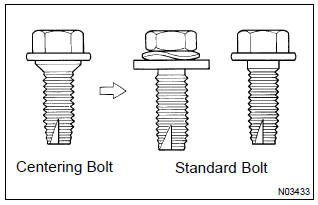
- Since the centering bolt is used as a door side hinge bolt, the door hinge cannot be adjusted with it on. Substitute the bolt with washer for the centering bolt.
1. Inspect rear door panel sub–assy lh
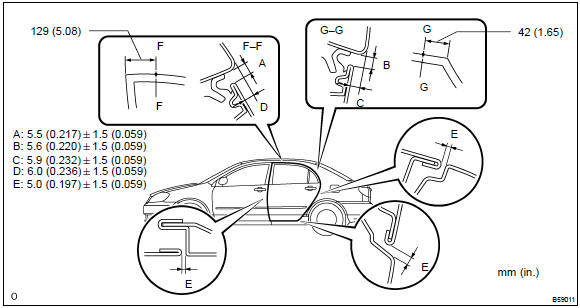
- Check that the clearance is within the standard value
2. Remove front door scuff plate lh
3. Remove rear door scuff plate lh
4. Remove front door weatherstrip lh
5. Remove rear door weatherstrip lh
6. Remove center pillar garnish lower lh
7. Adjust rear door panel sub–assy lh
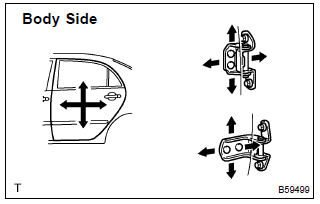
- Adjust the door by loosening the body side hinge nuts.
Torque: 26 nvm (265 kgfvcm, 19 ftvlbf)
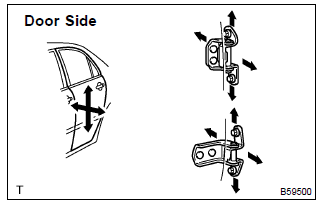
- Adjust the door by loosening the door side hinge bolts.
Torque: 26 nvm (265 kgfvcm, 19 ftvlbf)
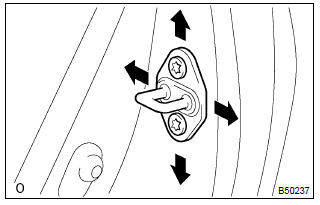
- Adjust the striker position by slightly loosening the striker mounting screws, and hitting the striker with a plastic hammer.
- tighten the striker mounting screws again.
Torque: 23 nvm (235 kgfvcm, 17 ftvlbf)


Other materials:
Replacement
1. Remove clutch start switch assy
disconnect the clutch start switch assy connector.
remove the nut and clutch start switch assy from the clutch pedal
support.
2. Install clutch start switch assy
install the clutch start switch assy with the nut.
Torque: 15.68 Nv ...
Inspection procedure
Hint:
hand–held tester only:
narrowing down the trouble area is possible by performing ”a/f control” active
test (heated oxygen
sensor or other trouble areas can be distinguished).
Perform active test using hand–held tester (a/f control).
Hint:
”a/f control” is the active te ...
Replacement
1. Disconnect battery negative terminal
2. Remove engine under cover rh
3. Remove starter assy
Disconnect the starter connector.
open the terminal cover.
remove the nut, then disconnect the starter wire.
remove the 2 bolts, then remove the starter.
4. Install starter a ...