
Toyota Corolla (E170) 2014–2019 Owners Manual / Interior features / Setup (Multimedia system) / Voice settings
Toyota Corolla (E170): Voice settings
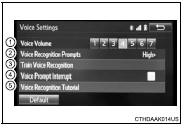
This screen is used for guidance for voice command systems setting.
1 Adjust the voice guidance volume setting.
2 Set the voice recognition prompts “High”, “Low” or “Off”.
3 Set the train voice recognition.
4 Set the voice prompt interrupt on/off.
5 Voice recognition tutorial
Share this page:


Other materials:
Components
...
Coolant
Replacement
1. Drain coolant
Caution:
to avoid the danger of being burned, do not remove the radiator
cap while the engine and radiator are still hot, as fluid
and steam can be blown out under pressure.
remove the radiator cap.
loosen the radiator and engine drain plugs, a ...